
Content marketing is an ideal approach for small businesses that want to stand out: while it does take time, it above all allows you to build a connection with internet users and position your brand as an expert in its field.
There are plenty of reasons to embrace it, but how do you get organised? How do you write the right content efficiently, work on its presentation to make it appealing, and distribute it to the right people?
We have listed 10 tools and tips to help you on this subject. 10 ingredients to succeed with your writing, your visuals, and their distribution.

Writing
Blog Topic Generator
Stuck for ideas for your article titles? The Blog Topic Generator site gives you a helping hand. Enter one to three keywords related to your topic and let the machine do the rest.
Unfortunately, this tool is in English and therefore only works in English. But a basic knowledge of the language should be more than enough to navigate it.
site:search
Google is a very useful search engine — and even more so when you know a few tricks about it!
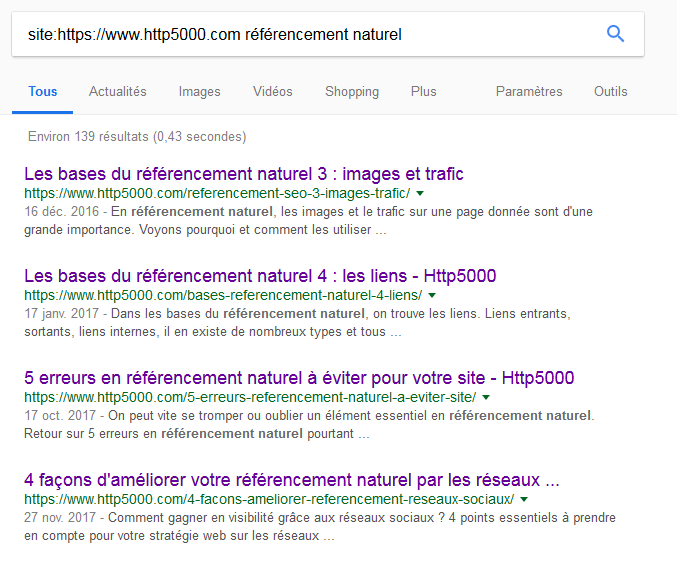
The "site search" is one such trick. It lets you perform a Google search within a specific website.
For example, if I'm looking for an article I wrote last year on the Http5000 blog about natural search engine optimisation, I simply search on Google for "site:https://yumea.fr référencement naturel" and all the previously written articles containing those keywords will appear in the results page!
Google Drive
Google Drive needs no introduction. And rightly so. This multi-purpose online tool is invaluable for writing, organising, and above all storing your article drafts.
Its interface, similar to a Word document, accessible at any time and from anywhere via your Gmail account, saves your files automatically. You no longer need to worry about losing your data after a power cut! And you can work under any circumstances; all you need is an internet connection.
As a bonus, Google also offers Google Calendar: perfect for planning your upcoming content and scheduling when to publish it.

Visuals
GIPHY
Visuals are very important in web communications. And GIFs hold a special place in this domain. They catch the eye through their animation and are easy to consume. But where do you find the ideal GIF for a given piece of content?
The Giphy site is a particularly comprehensive GIF search engine where you are sure to find exactly what you need.
Freepik
Another excellent visual resource, Freepik provides free Illustrator files (paid visuals are also available).
A few clicks in Illustrator (select, delete) and you can strip the visual of elements you don't need. Add a simple background if there isn't one already, and you have a visual for your article!
Note: beyond a certain number of downloads in a given day, Freepik blocks your downloads. Simply create a free account to lift this restriction.
Canva
Still on the subject of visuals, you will inevitably need images and graphics. This can become problematic if you're not particularly comfortable with Photoshop or other image editing software.
No need to panic — Canva is here to save you! This free (some options are paid, but the free version already offers a wide range of choices), intuitive online tool lets you create eye-catching visuals in just a few clicks. The ease of Paint combined with the attractive results of Photoshop? While Canva obviously cannot perform processing as advanced as Photoshop, the idea is very much there.
Image Color Picker
You want to create a visual in your brand's colours, but you can't quite remember the shade of red you use in your logo?
No need to panic — Image Color Picker will find it for you! Simply upload your logo image online and click on the colour of your choice. The tool will generate the corresponding colour code, allowing you to apply exactly the right shade to your visuals. As simple as that!
Nimbus Screenshot
Taking a screenshot of a web page or folder can be very useful, especially if you're creating educational or tutorial content.
But while everyone knows the famous "Print Screen" key on their keyboard, we also know that it only captures a fixed area of the screen. What do you do when you want to capture a long page that requires scrolling several times to see the full information?
Nimbus Screenshot lets you do it in just a few clicks. You select the area to capture and you're done. Bonus: the tool also does "video screenshots" or screencasts. Same concept but, as you'll have guessed, in video! A great way to easily create tutorial videos to present tips, your brand, a product, or a service.

Distribution
Missinglettr
If creating content is the starting point of your web communications, distributing it remains the key ingredient. A piece of content, however good, will get you nowhere if no one consumes it.
But you still need to have the time. Managing a social media account is a job in itself; full-time positions for community managers and social media managers are growing in number every year.
The task is all the more difficult because a message posted on a social network only has a limited lifespan. After a few days — or even just a few hours — it will no longer appear in your target audience's news feed.
Hence the value of sharing your content again and again. That's where Missinglettr comes in — a tool as recent as it is invaluable. In a few clicks, you can schedule 12 different reposts of the same piece of content, spread over a year! Ideal for planning your distribution well in advance.
One downside: the free version only allows 2 campaigns per month (2 pieces of content, each shared 12 times per year), which significantly limits its usefulness.
Be careful, however, not to go overboard. While a tool for scheduling content is extremely helpful, it should not become your sole means of engaging on a given network. Nothing will ever replace a human presence — for monitoring, responding to users, and analysing data. Scheduling to save time: yes; scheduling excessively and only logging in to your accounts once a month: no.
Slideshare
While images and videos remain the most popular formats on the web, the PowerPoint presentation is not far behind. Proof of this: entire platforms are dedicated to it. And it's no surprise — it's an excellent format for sharing your knowledge in a clear and engaging way.
Slideshare is one of the best-known platforms in this space: it lets you share your slides with a wide audience simply, and embed your presentation directly on your own pages. This makes it an excellent distribution tool as well as a particularly practical resource for building your blog articles.
These 10 tools can genuinely transform your daily workflow and lighten many of the tasks you will need to carry out as part of a content marketing strategy.
YOU MIGHT ALSO LIKE
UGC, the future of marketing: how user-generated content can revolutionise your marketing strategy
by Yumea, 7 March 2023
UGC (User Generated Content) is changing the game in the world of marketing. With the rise of social networks and content-sharing platforms, consumers have become content producers in their own right... READ MORE
Category: News , Becoming visible online , Social media
Comments: 0
How to use Instagram to reach your audience and drive traffic to your site?
by Yumea, 1 February 2023
Social media has become an indispensable tool for businesses looking to reach their target audience and drive traffic to their website. With more than 3.8 billion active users... READ MORE
Category: Becoming visible online , Instagram , Social media
Comments: 0
7 artificial intelligence (AI) tools to know in 2023
by Yumea, 12 January 2023
In 2023, there are many sites that use artificial intelligence (AI) to help users write content and generate images. If you are looking for tools to help you write... READ MORE
Category: News
Comments: 0