
As the professional social network it is, LinkedIn requires above all else that you have already built out your profile. That is the heart of the engine — without it, any attempt at networking will be hit-or-miss. LinkedIn operates on a freemium model, much like Spotify. In other words, the platform makes content available for free. However, for an optimal user experience, you will need to subscribe to a premium plan. But do not worry — we have thought of you! That is why we are offering a few tips to get around the limitations of the free plan.
Download the free checklist for a LinkedIn profile that converts
The Limitations of LinkedIn's Free Plan:

1. The Monthly Search Limit
If you regularly use LinkedIn to build your B2B network, you have no doubt already come up against the commercial use limit.
LinkedIn calculates your people-search usage based on your overall activity on LinkedIn from the first day of each calendar month. If you view the profiles of people who are not in your first-degree connections, LinkedIn will infer, after a certain number of views, that you are using it for commercial purposes — such as client prospecting.
Once you have reached your commercial use limit, you can only view the first three profiles in your search results, with the rest being inaccessible. This limit is then reset on the 1st of each month.
2. The Daily Invitation Limit
Sending invitations to join your network may be temporarily restricted. Either because you have sent a large number of invitations in a short space of time, or because a large proportion of them have been declined or ignored.
Tips:
- Limit yourself to inviting a maximum of 50 people per day to avoid exceeding the quotas. Without this, LinkedIn will first send you a warning, then temporarily block your account — and in the worst case, delete it.
- If warnings are repeated, stop sending invitations for a few days or wait for the start of the following month.
- Bear in mind that these limits are monthly and that your account is "reset" at the start of each month.
3. Limited Visibility of Industry Sectors
I do not know if you have ever paid attention to this, but when searching using the filter tool, LinkedIn does not present you with a dropdown list of all industry sectors. You have to find the ones that interest you yourself, and risk overlooking some.
Oh, but wait! I almost forgot — our wonderful editorial team has put together a handy document to help you know them all. Just saying.
4. Difficulty Sending Messages to People Beyond Your 1st-Degree Connections
If you are not connected with someone, it will be impossible to send them a message, as they are therefore not part of your 1st-degree connections. If you would like to better understand how LinkedIn's connection levels work, I invite you to read more here
So how do you deal with all these restrictions? Some of them are unfortunately unavoidable. However, our team is going to share its little secret for avoiding the search limit and connecting with your 3rd-degree network.
A Few Techniques to Overcome These Limitations:
1. Copy/paste the search filter URL
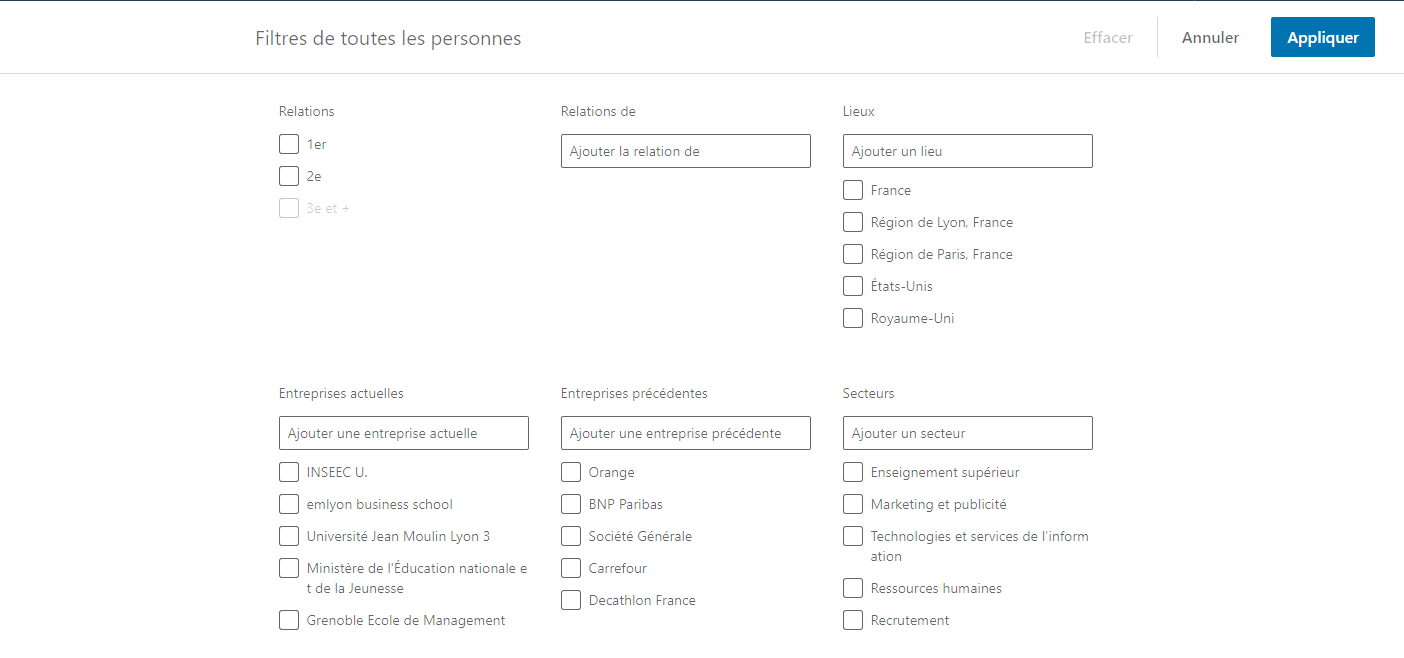
The platform's internal search engine allows you to target people very precisely. However, each search you carry out brings you closer to the maximum threshold set by LinkedIn. To avoid this, you can perform your search using the advanced search system, then save the URL. You can then copy and paste it as-is and reuse it on any account.
What does this look like in practice?
Every time you click "apply", you use one "filtered search". Without being able to determine the exact number of searches available to your account, you risk quickly receiving a limit notification and an invitation to upgrade to a paid plan.
The tip here is to copy and paste the response URL, which looks something like this:
https://www.linkedin.com/search/results/people/facetGeoRegion=%5B%22fr%3A5210%22%5D&facetIndus t ry=%5B%22140%22%2C%2280%22%2C%2214%22%5D&facetNetwork=%5B%22S%22%5D&facetProfile L anguage=%5B%22fr%22%5D&origin=FACETED_SEARCH
…in order to reuse it later without "consuming" your search credits. I know it is a rather unusual tip, but you will be very glad to be able to keep inviting people without getting blocked — so keep it in mind and save your search URLs in a Word document.
2. What to Do If You Have No 2nd-Degree Connections in Your Target?
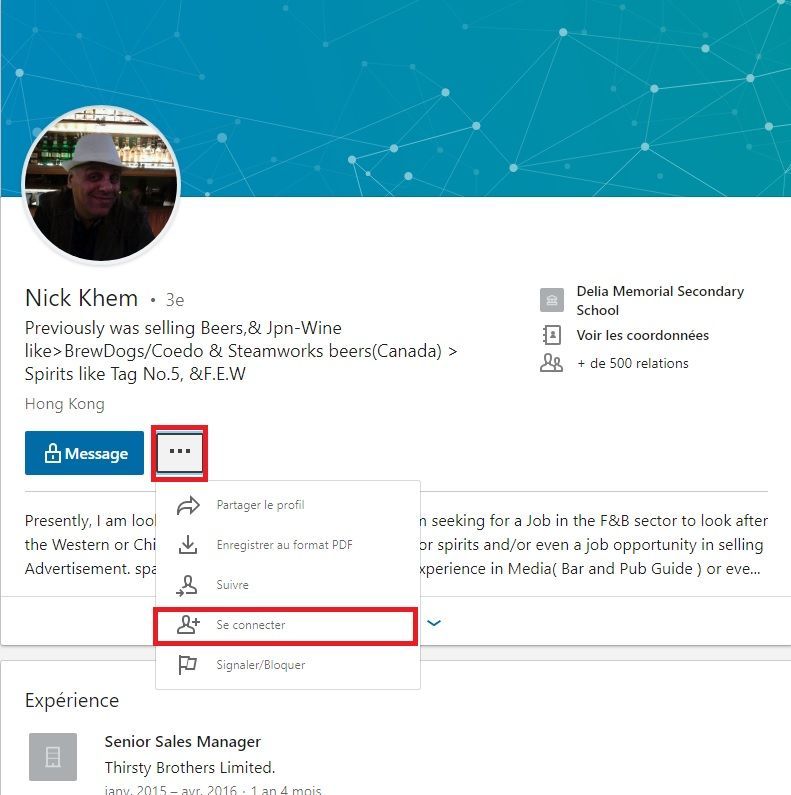
Search for companies and groups related to your target, access the employee (people) lists, and you will be able to invite people belonging to the 3rd degree and beyond. Not all of them, but at least some. Sometimes the invite button will be replaced by a padlock before the word "message". In that case, go to the person's profile and there, as if by magic, the "…" next to "message" will offer you the option to connect.
Remember That LinkedIn Requires Daily Effort
Did you know that each user spends an average of 17 minutes per month on LinkedIn? This may seem extremely little, but it is mainly because some people create their profile solely in the context of job searching.

Be Active
Make a point of taking 20 minutes each day to add new connections and contribute to growing your community. This could mean adding 5 people every day, reacting to your 1st-degree connections' posts, or even publishing something yourself to reinforce your expertise in a particular area.
Tip: when it comes to posts, there are tools that allow you to schedule content for a chosen period and time. If you want to know when to post for maximum reach, I invite you to read our next article on the subject.
To summarise:
- expand your network by starting with advanced searches that closely match your persona
- to avoid hitting search limits, copy/paste the URL after selecting your search criteria
- limit yourself to adding a maximum of 50 people per day
- add people from your 2nd-degree connections every day to grow your network intelligently
- make the effort to work on LinkedIn consistently
YOU MAY ALSO LIKE
UGC, the Future of Marketing: How User-Generated Content Can Revolutionise Your Marketing Strategy
by Yumea, 7 March 2023
UGC (User Generated Content) is changing the game in the world of marketing. With the rise of social media and content-sharing platforms, the ... READ MORE
Category: News , Getting Visible Online , Social Media
Comments: 0
How to Use Instagram to Reach Your Audience and Drive Traffic to Your Website
by Yumea, 1 February 2023
Social media has become an indispensable tool for businesses looking to reach their target audience and drive traffic to their website. With more than 3.8 billion active users ... READ MORE
Category: Getting Visible Online , Instagram , Social Media
Comments: 0
7 Artificial Intelligence (AI) Tools You Need to Know in 2023
by Yumea, 12 January 2023
In 2023, there are many websites that use artificial intelligence (AI) to help users write content and generate images. If you are looking for tools to help you write ... READ MORE
Category: News
Comments: 0