
Once you have switched from a personal account to a professional one, you gain access to your profile's statistics. This information is important if you want to grow your Instagram account at scale. And yes — analysing the behaviour of your visitors means you will be able to offer more relevant, better-targeted content.
At the time of writing this article, several methods exist for measuring your Instagram account's statistics. Here, however, we are going to focus on the platform's own built-in analytics tool: Instagram Insights. Bear in mind that you will need a business account in order to access this information.
What is Instagram Insights?
When you explore Instagram Insights, you will discover a wide range of terms, graphs, and figures, all pointing to important statistics. Let us now delve into Instagram Insights, defining the meaning of each statistic and how you can extract valuable, practical information from them!
To access Instagram Insights, go to your profile page and tap on your profile visits count at the top — you can also tap the menu button in the top right corner and find "Insights" as the first option.
Instagram Insights is divided into three tabs, each containing different information:
- Content
- Activity
- Audience
How to access your account statistics
For an overview of your entire Instagram account, start by visiting your profile. Then, at the top, click on the bar chart icon, which will take you to your general overview. As a reminder, only business accounts have access to this information.
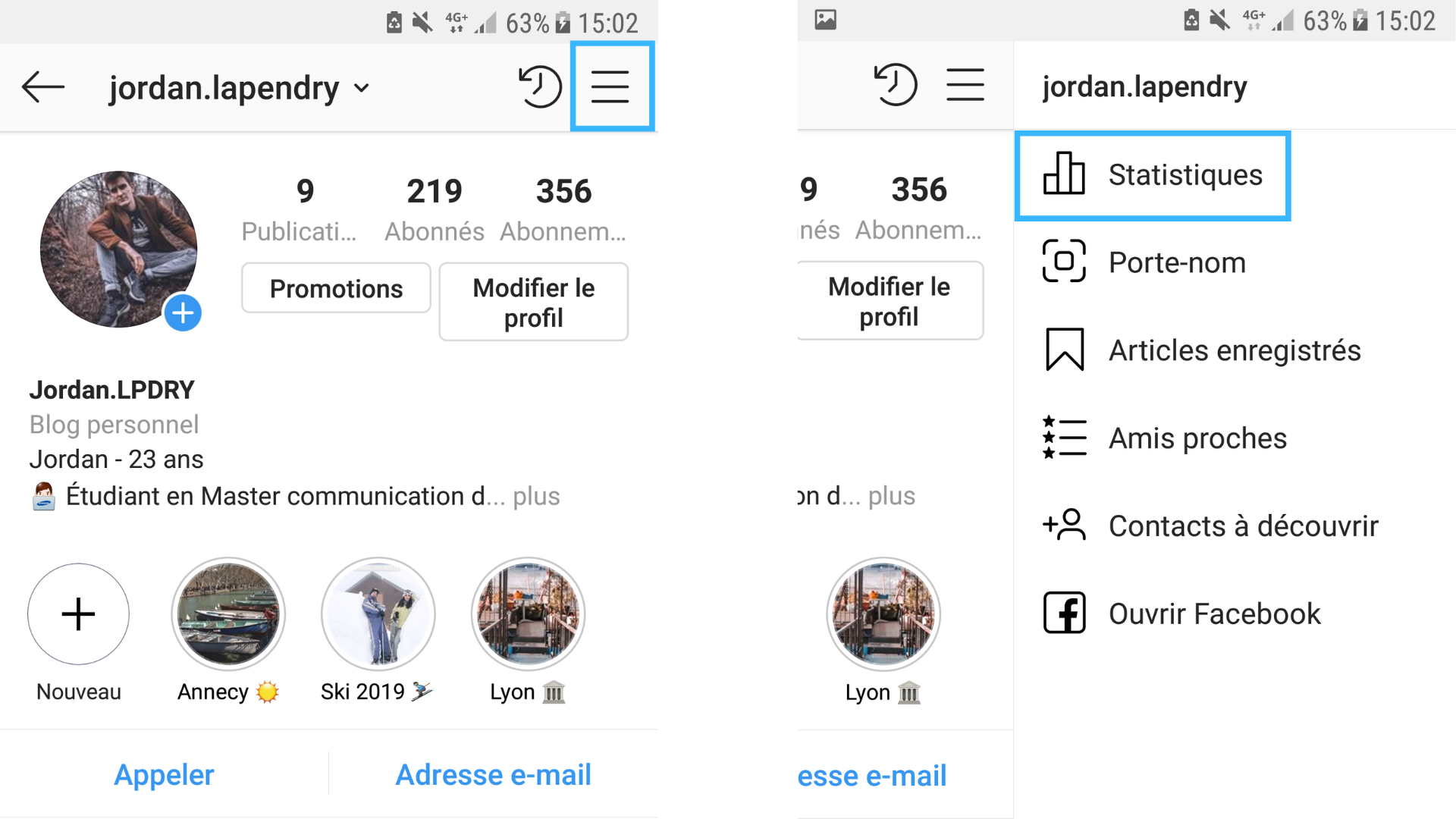
Understanding the various statistics in the feature
Instagram Insights is divided into three tabs, each containing different information:
01. Your profile activity
Under the Activity tab, you will find two sets of Instagram Insights: Interactions and Discovery. Let us examine each sub-section and find out what each statistic means…
Interactions:
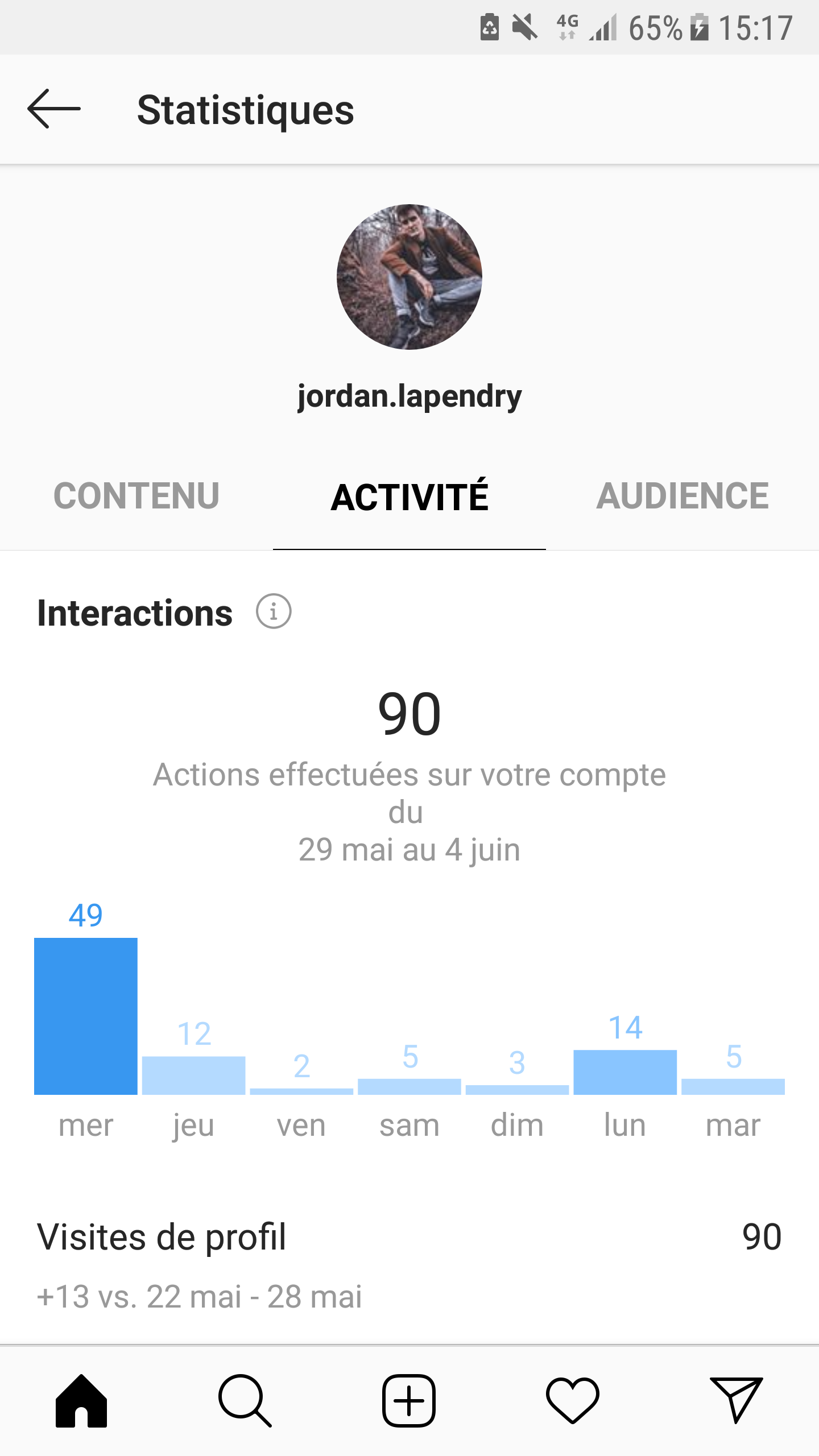
In this sub-section, you can see the total number of actions taken on your account over the previous week, followed by a breakdown of individual metrics. Here is what these Instagram Insights mean:
- Profile Visits – The number of users who visited your Instagram profile.
- Website Clicks – The number of users who clicked the website link in your bio.
- Emails – The number of times users tapped Email on your profile.
- Calls – The number of times users tapped Call on your profile.
Using the graph, you can see which day of the week generates the most interactions, as well as a comparison with the previous week. It is worth noting that this section of Instagram Insights is limited to the last 7 days; however, other Instagram tools such as Hopper HQ's Analytics can show you up to 28 days.
Discovery
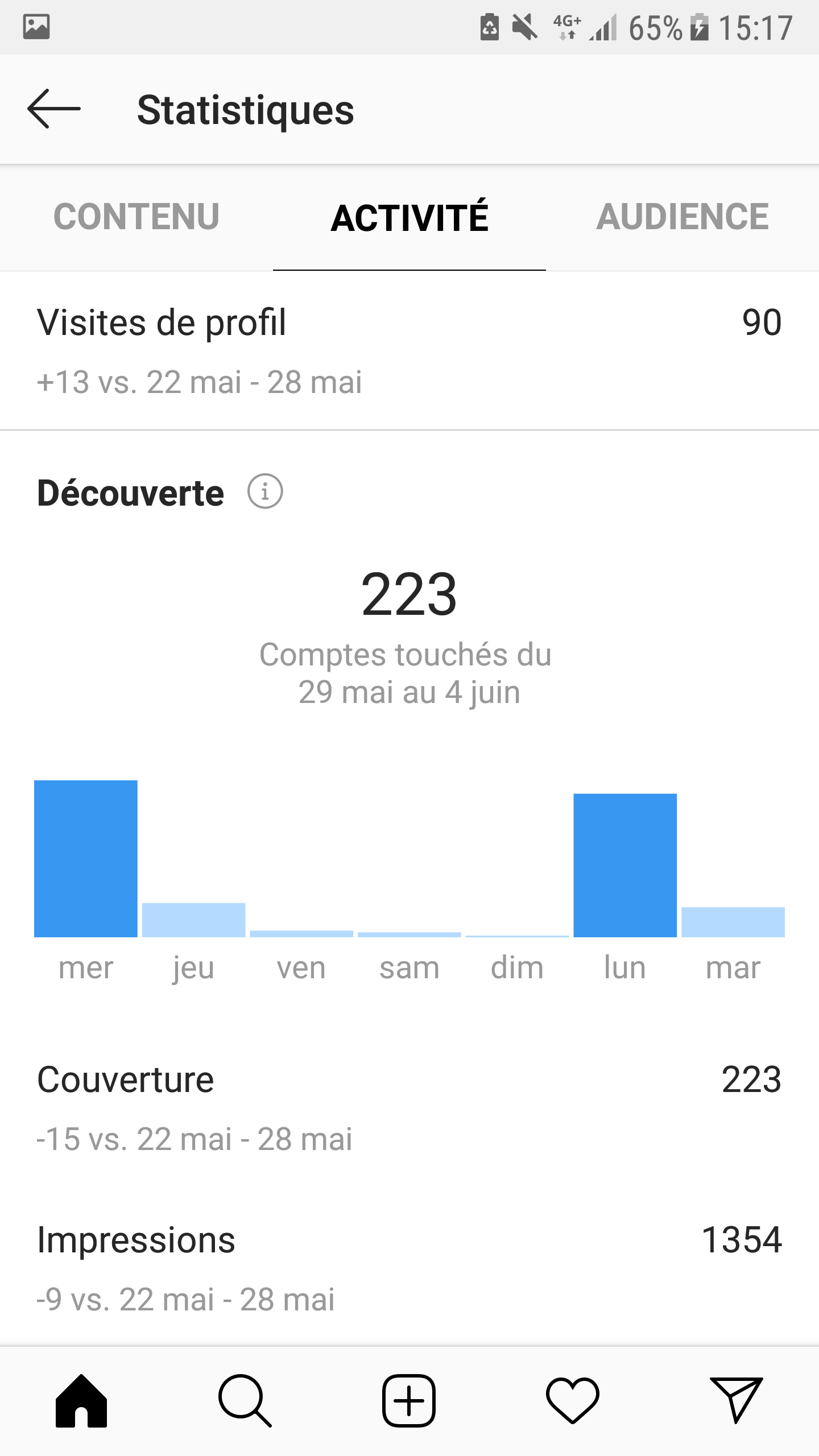
The next sub-section presents the overall reach and influence of your Instagram account using two key metrics: Reach and Impressions.
- Reach – The number of unique accounts that saw at least one of your posts.
- Impressions – The total number of times all your posts have been viewed.
This week-by-week information is extremely valuable, as you can compare your reach against specific campaigns or social activities. Tracking these metrics is important for understanding whether your efforts to promote your Instagram account are paying off, and they should form a key component of any social media marketing strategy.
The Activity tab of Instagram Insights therefore reveals the influence of your page, as well as details about how people have interacted with it. It is worth noting, however, that this section of Instagram Insights is also limited to the last 7 days.
02. Your profile content
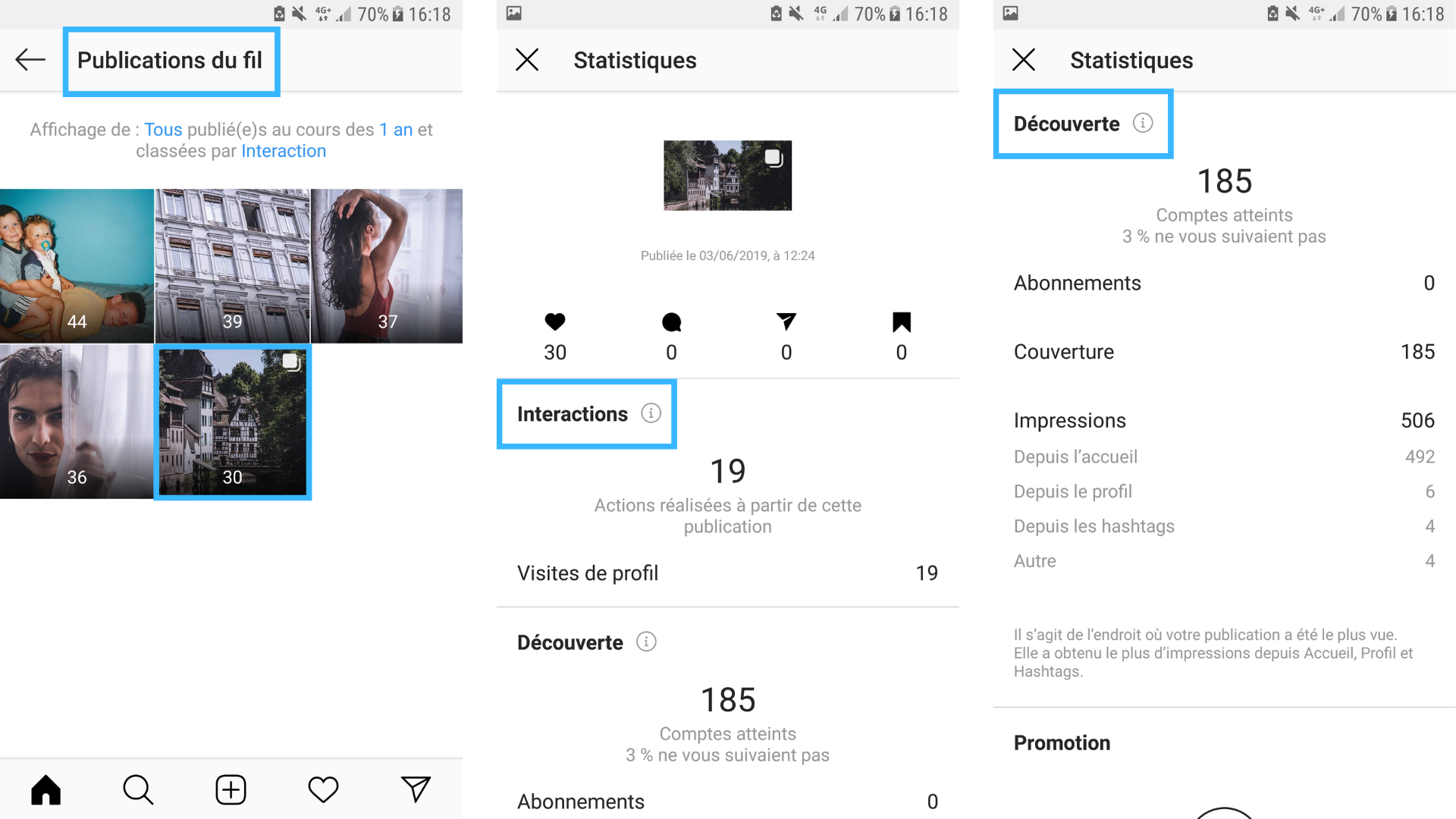
Under the Content tab, you will find Instagram Insights relating to individual posts on your profile. This includes photo and video content, Stories, and even any paid promotional posts you have published. The Content tab is divided into: Feed, Stories, and Promotions…
The Feed section of Instagram Insights is the simplest way to see which type of content performs best with your audience and to track your engagement rate over time. In the Discovery section, you can see whether your hashtag strategy is having a positive impact on reach — another equally valuable metric within Instagram Insights!
Feed
Here you will find all the important Instagram information about the content in your feed over the last 2 years! You can sort your insights by content type, metric, and time period. Here are the Instagram Insights you can filter by and what they mean:
- Calls – The number of unique accounts that followed the CTA to call.
- Comments – The number of comments on your post.
- Emails – The number of unique accounts that followed the CTA to send an email.
- Engagement – The number of unique accounts that liked, commented on, or saved your post.
- Followers – The number of accounts that started following you as a result of your post.
- Impressions – The total number of times your post was viewed.
- Likes – The total number of likes on your post.
- Profile Visits – The number of times your profile was viewed.
- Reach – The number of unique accounts that saw your posts.
- Saves – The number of unique accounts that saved your post.
- Website Clicks – The number of times your website was clicked as a result of your post.
03. Your profile audience
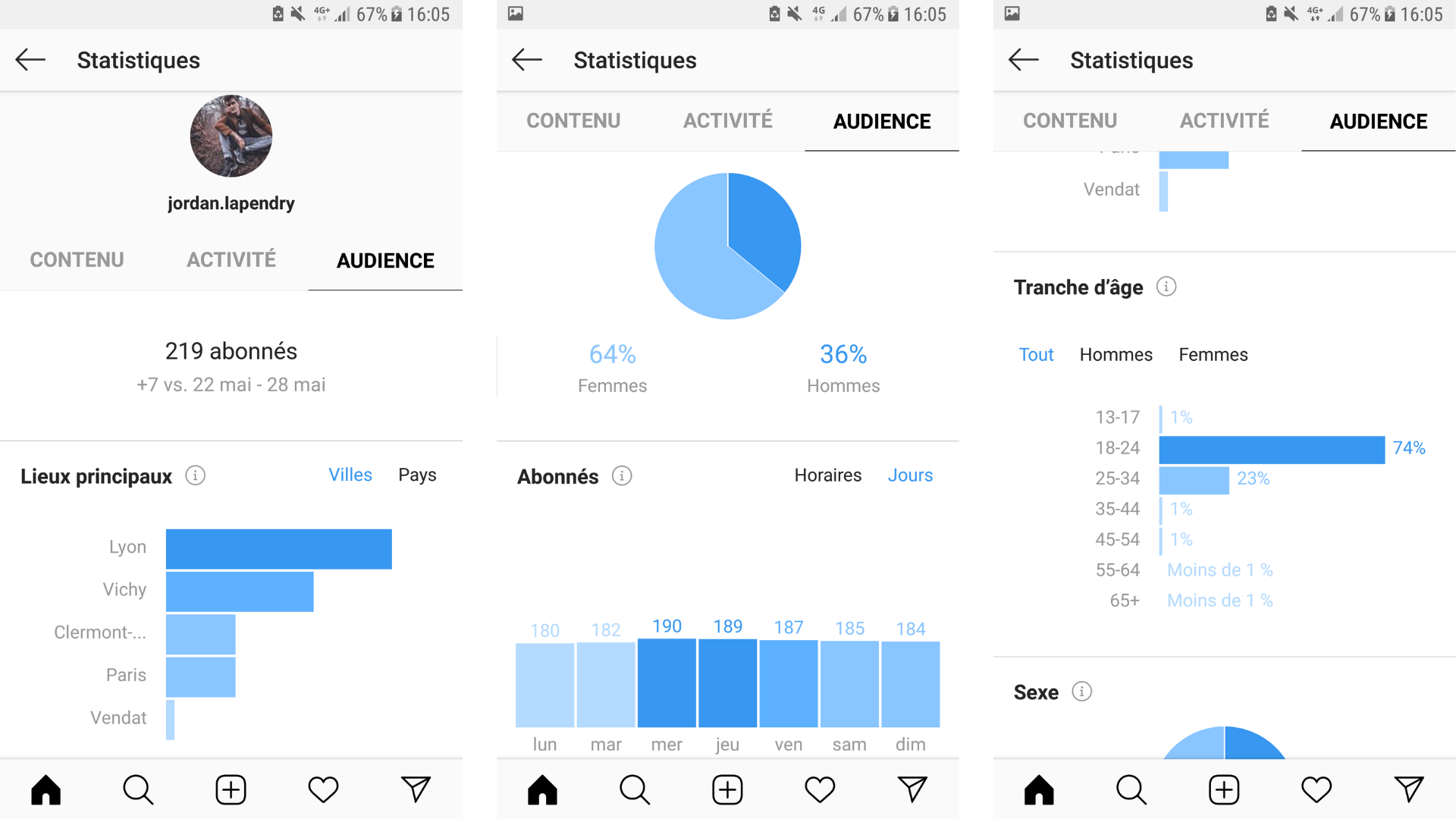
The final tab of Instagram Insights is Audience. This is where you can gain a better understanding of who your followers are and where they live, and see how your follower count has changed compared to the previous week.
In the Audience tab of Instagram Insights, you will find 4 key sets of information about your followers:
- Gender – The percentage breakdown of your followers.
- Age Range – The age brackets of your followers.
- Top Locations – The locations of your followers, by city and country.
- Followers – The most active times of your followers, by time of day and day of the week.
As you can see, the Audience section reveals the main Instagram insights about your followers that can help you build and improve your Instagram marketing strategy. Not only can you gain a better understanding of who follows you, but you can also identify when your followers are most active — helping you to better plan and schedule your Instagram posts to reach as many people as possible.
Go even further to find the best time to post on Instagram by connecting your business profile to Hopper HQ's free tool! They analyse your follower behaviour and your posts' average engagement to tell you the optimal time to post for maximum engagement on your profile!
To summarise
Instagram statistics give you a broader view of your account — in particular, by letting you know what is working and what is not in terms of your posts. In this way, you can adjust your content to make it as effective as possible for your target audience.
As a reminder:
- to use Instagram Insights, you need to switch your account to business mode;
- statistics are split into 3 categories: activity, content, and audience;
- the purpose of statistics is to gain a better understanding of the people viewing your posts and to adjust your content based on what resonates best with them.
YOU MAY ALSO LIKE
UGC, the future of marketing: how user-generated content can revolutionise your marketing strategy
by Yumea, 7 March 2023
UGC (User Generated Content) is changing the game in the world of marketing. With the rise of social media and content-sharing platforms, the … READ MORE
Category: News , Getting visible online , Social media
Comments: 0
How to use Instagram to reach your audience and drive traffic to your website
by Yumea, 1 February 2023
Social media has become an indispensable tool for businesses looking to reach their target audience and drive traffic to their website. With more than 3.8 billion active users … READ MORE
Category: Getting visible online , Instagram , Social media
Comments: 0
7 Artificial Intelligence (AI) tools you should know about in 2023
by Yumea, 12 January 2023
In 2023, there are numerous websites using artificial intelligence (AI) to help users write content and generate images. If you are looking for tools to help you … READ MORE
Category: News
Comments: 0