
This article will help you find your way around in terms of user-oriented communications strategy (or inbound marketing). This approach focuses efforts on winning new clients in a less "intrusive" way than other marketing practices. It does, however, use its own terminology which, while straightforward to understand, remains unfamiliar to someone just starting out or beginning to take an interest in the field. The list of definitions that follows is intended to help clarify things. We always try to provide clear explanations, but this page can serve as a reference whenever you come across an unfamiliar term. To put the definitions that follow into context, a brief reminder is useful. Inbound marketing, or user-oriented communications strategy, consists of attracting new visitors to your website. From there, the goal is to turn those visitors into leads, and then into clients. To do this, you will need — in order — an offer, a thank-you page, a landing page, a call-to-action button, and a blog. No need to worry: all the explanations and definitions are below. You can dip into this glossary whenever needed, or read it all in one go to get a better picture of the inbound marketing concept as a whole.
Blogging:
Blogging, as the name suggests, involves managing and regularly updating a blog with the ongoing publication of blog articles. It is an essential element of inbound marketing, since it is through blog articles that prospects will find you. Each article leads, via a call-to-action button, to a landing page and therefore an offer.
Buyer journey:
The call-to-action button is an image that links to a landing page. Placed on several articles at strategic locations, it encourages the visitor to click through to access the relevant free offer. Example of a call-to-action button as an image:
Call-to-action button (CTA):
Once you have your ideal customer profile (Buyer Persona), keep their journey in mind. The buyer journey is divided into 3 stages:
- The awareness stage: this concerns a visitor who is trying to understand a problem they are facing — a "symptom". For example, "Why am I not managing to attract new fans to my Facebook page?".
- The consideration stage: here, the visitor has understood their problem and is looking for a solution. To keep the same example, our visitor has realised they are not using their tools correctly and is now looking for ways to optimise their Facebook page. They are therefore reading blog articles on a communications agency's site, such as "10 ways to attract new Facebook fans".
- The decision stage: the visitor is fully aware of their problem and the possible solutions. They decide on the solution to adopt — the one that best suits them. In our example, our visitor either applies the advice they have read, or, realising that managing a page is too time-consuming for them, finds a provider to handle their Facebook page. In such a case, the agency's "Our services" page is there for them.
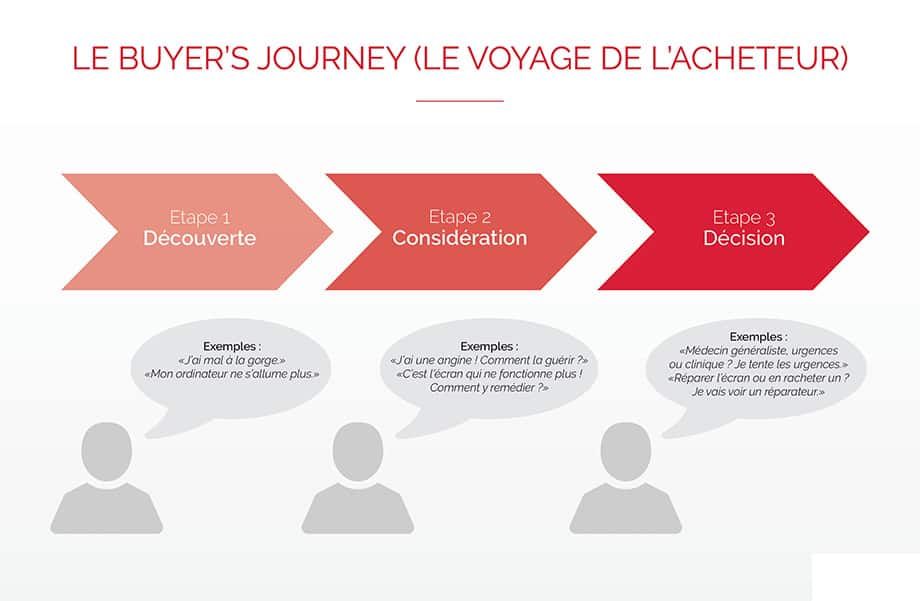
Each piece of content should correspond to one of these three stages, in order to serve all prospects — from those just discovering their problem and their "symptoms" to those already ready to purchase your services or products.
Buyer persona:
This is the profile of your ideal client. A brand can in fact have several buyer personas, but we will use the singular for simplicity. A buyer persona is a semi-fictional representation of your ideal client. This representation is based on concrete facts: market research, interviews with your current clients — anything that helps identify the key trends among your customer base. Your buyer persona will guide you in creating content (blog articles, offers, etc.) tailored to your prospects. If your content can address the needs of your buyer persona, then it will address the problems of real-life prospects at the same time!
Download an example buyer persona to better grasp the concept!
Inbound marketing:
User-oriented communications. The idea is to speak to visitors about their problems and offer them solutions, rather than trying to sell them your products or services at all costs. Visitors feel more confident, have a better impression of the brand, and when they are ready to become a client, they prioritise that brand over competitors who have focused solely on selling at any price.
Lead:
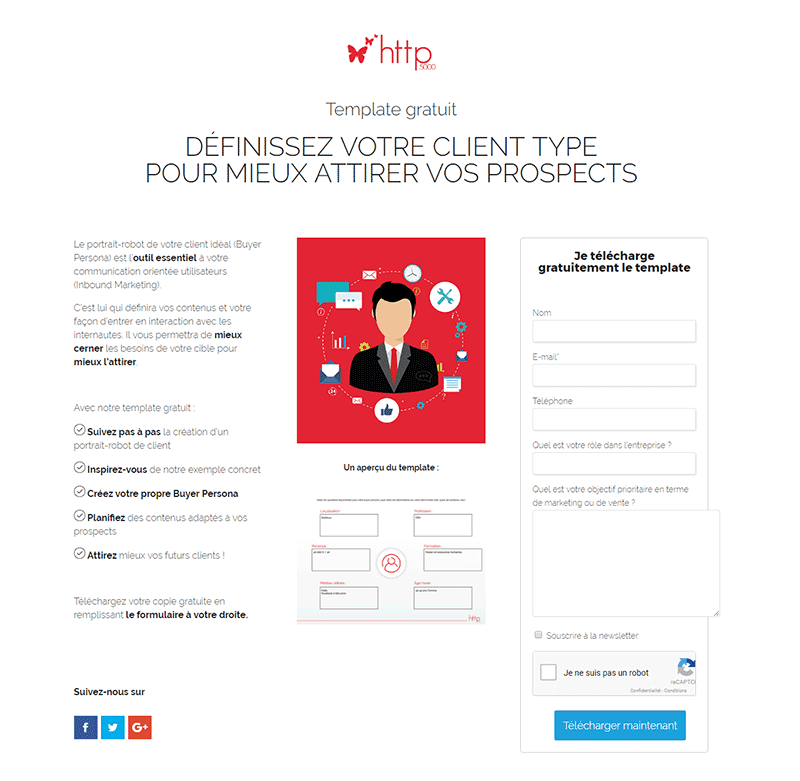
The landing page is a clean page, without a menu, that presents an offer. The purpose of this page is to encourage the visitor to provide their details in order to download the offer, without distracting them with external elements (such as the menu). Example of a landing page as an image:
Landing page:
We talk about a lead when we obtain information about a potential prospect (their email address, their problem, etc.). With inbound marketing, leads are obtained by offering free content to download. The lead is then nurtured and tracked using software: you can see which lead is ready to become a client and which still needs time to think. Rather than calling the latter with a sales pitch, it is better to "nurture" them gently. This lead is interested in website creation but is not yet ready to build their own? Send them a personalised newsletter offering advice on creating websites. When they are ready, they will remember you — because you provided solutions without overtly trying to sell them something. If you do end up calling them or sending a sales email, you can tailor your message to their specific problem and let them know you listened to what they had to say.
Offer:
The offer is the digital file you give away for free to a visitor in exchange for information about them. For example, you offer an ebook "10 ways to build a successful website" as a free download. An interested visitor fills in a form, providing their name and email address (and any other information you might want), and can in return access the ebook. You receive this information and can make use of it when the time comes. Congratulations — you have just obtained a lead!
Thank-you page:
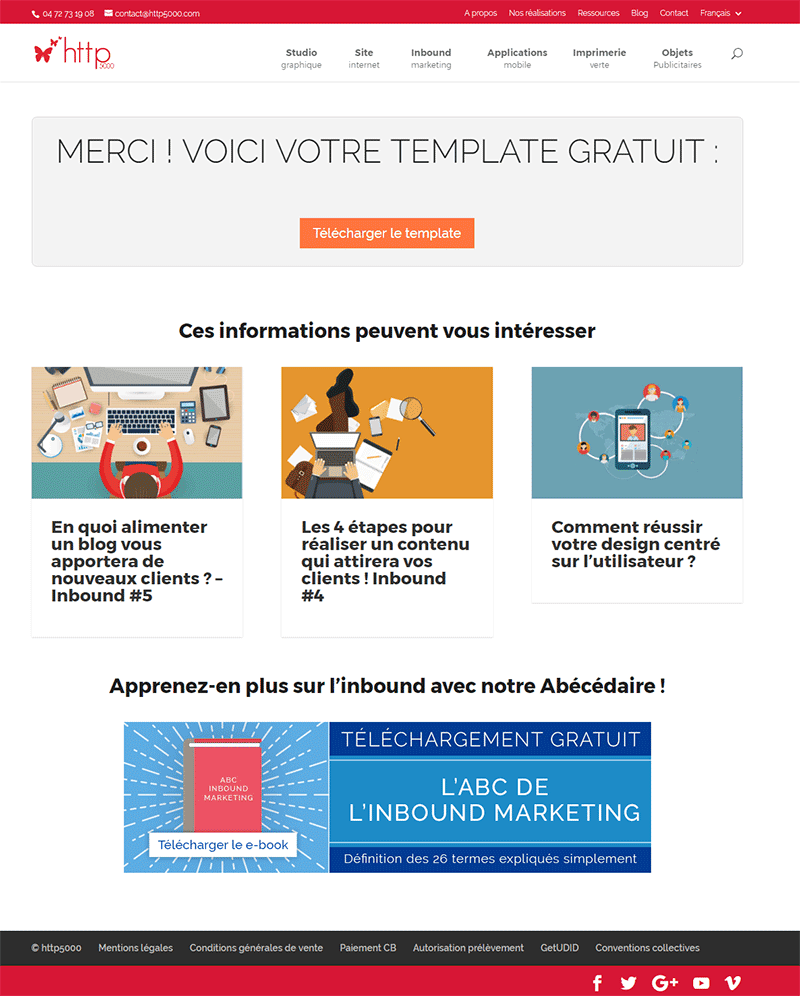
The thank-you page arrives at the end of the journey for the visitor. From a blog article, they clicked a call-to-action button, which took them to a landing page where they entered their email address to access the free offer. The thank-you page appears at this point. As the name suggests, it thanks the visitor and displays the free download button for the offer. Example of a thank-you page as an image:
We hope these definitions help you see things more clearly. For any questions, do not hesitate — Http5000 is here for you!
YOU MIGHT ALSO LIKE
UGC, the future of marketing: how user-generated content can revolutionise your marketing strategy
by Yumea, 7 March 2023
UGC (User Generated Content) is changing the game in the world of marketing. With the rise of social media and content-sharing platforms, the ... READ MORE
Category: News , Getting visible online , Social media
Comments: 0
How to use Instagram to reach your audience and drive traffic to your site?
by Yumea, 1 February 2023
Social media has become an indispensable tool for businesses looking to reach their target audience and generate traffic to their website. With more than 3.8 billion active users ... READ MORE
Category: Getting visible online , Instagram , Social media
Comments: 0
7 artificial intelligence (AI) tools to know in 2023
by Yumea, 12 January 2023
In 2023, there are many sites using artificial intelligence (AI) to help users write content and generate images. If you are looking for tools to help you write ... READ MORE
Category: News
Comments: 0