
In an educational content strategy, website visitors become prospects and then clients thanks to the content you offer them. One of the essential steps in this transformation is the form. Today, we explain how to create a form that will turn unknown website visitors into leads and then into clients!
What role does a form play in an educational web communications strategy?
A user-oriented communications strategy (inbound marketing) uses educational content (blog articles, videos, etc.) to demonstrate the value you can bring to website visitors. The goal is to show your expertise and convince them to choose you — not through a sales pitch like competitors might use, but by showing that you are interested in them and that you have solutions to their problems.
In simple terms, a visitor arrives on your site via a blog article shared on social media. The article addresses a problem the visitor is currently facing or is keenly interested in. They want to know more — which is handy, because you have even more precise content to offer them, for free! To access it, all they need to do is fill in a form.
This form is the cornerstone of your educational strategy. It is the gateway through which the visitor accesses your content, so it must not put them off. And it is through this form that you gain more or less detailed information about the visitor, turning them into a lead (and perhaps, later on, a client!) — so it must enable you to collect the essential information for the next steps.
What essential information should a form request in an inbound strategy?
The first piece of information that will appear in absolutely every inbound form is the email address. You want to be able to get back in touch with your prospect — that is the whole point of your educational strategy. If only one question is to be asked in such a form, that is the one.
The other information will depend on you. What do you need to know in order to "nurture" your prospect? And, conversely, what type of prospect does not interest you?
For example, suppose you offer a solution for SMEs only. A freelancer or a large corporation does not fall within your target. So ask about the type of company the visitor/prospect works for. If they match your target (an SME), you know you are on the right track. If they fall outside it (a freelancer), you know it is not worth spending time on this particular prospect. You will save yourself time.
How many fields should you add to your form?
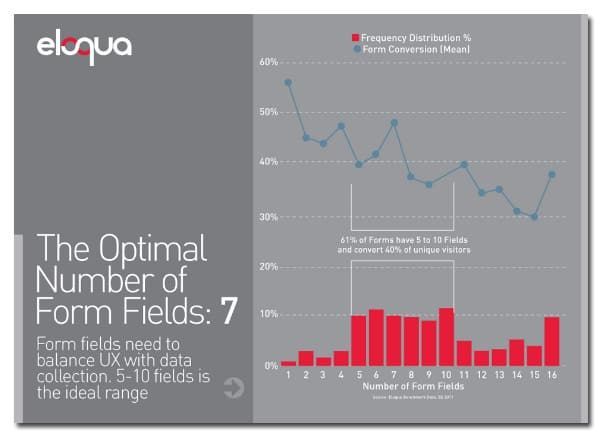
According to a study by Eloqua, 5 to 10 fields is the ideal number. While this gives you a broad idea, it is important to bear in mind that these are general trends. It is always useful to know, but keep the following in mind to help you strike the right balance:
A number of fields proportionate to the value of the downloadable file:
The more the visitor wants your file, the more you can afford to increase the number of fields in your questionnaire.
For example, if your free offer is an infographic summarising information you share across your site, opt for a short form. Simply include a field asking for the visitor's email address (the essential field for any form), or perhaps a checkbox to subscribe them to your newsletter.
If you are offering a white paper with detailed information on a specialist area of expertise, you can ask for more: the email address as always, the type of company the visitor works for, whether they have a project related to the downloadable content, whether that project is imminent or further off, and so on.
How to create a successful form
Distinguish between essential questions and useful questions:
Always think about the questions you will ask in your form in these terms.
First, the essential questions: these are the contact fields (email or phone number), which are critical and upon which your entire form and educational strategy depend.
Then the useful questions: these will be added according to the importance of your downloadable file, as discussed above. They aim to deepen your knowledge of the visitor, on the principle that the more you know about them, the better you can nurture them into becoming a client.
If you need to shorten your form for any reason, the useful questions are the ones to cut.
Do not add questions simply to reach a certain quota (the 5 to 10 questions from the Eloqua study, for instance) or to match the length of an important downloadable file. If you only need 3 questions to profile your prospects, then your form will have 3 questions.
Think about the order of your questions
Start the form with closed questions with free-text answers — that is, fields such as email address, phone number, first name, surname, company name, etc. These are quick to fill in but still require the respondent to type their answers.
Why put these questions first? For two reasons:
- These fields contain contact details (email and/or phone number) and, as we have seen, a form like this must at the very minimum allow you to contact your prospects.
- Visitors can easily abandon your form if they find it too time-consuming or off-putting. And free-text answers are precisely what takes the most effort, whereas multiple-choice questions simply require selecting an answer that is already provided. By placing free-text questions at the start, you allow the visitor to get the hardest part of the form out of the way immediately, and you take advantage of the fact that they have just arrived on your page and are still 100% motivated to download your file.
After the free-text fields (which should remain short and not invite lengthy answers), place the multiple-choice questions (type of company, market type, job role, etc.). Again, there are two reasons for this:
- These are the questions that require the least mental effort, allowing visitors to continue filling in the form with ease.
- Visually, the result will be better and more pleasing to the eye. Free-text fields at the top, taking up little space, and multiple-choice questions with their drop-down menus at the bottom.
At the end of the form, you can add an optional open-ended question (for example, "What are you hoping to achieve with your web communications?").
The open-ended question must come at the end so as not to put visitors off in the very first lines. And it must be optional — that is, while the email address field is compulsory (the download will not start if it is left empty), the visitor must be able to skip the final open-ended question.
This way, the visitor who takes the time to answer will provide you with valuable, qualitative information about themselves. The visitor in a hurry, or who does not wish to answer, will still be able to download your file and share their details with you.
Finally, you can add 2 other elements at the end of the form — checkboxes:
- I would like to receive the newsletter from "Your brand name"
- I would like to get in touch with a member of your team
Again, depending on the importance of the downloadable file and how relevant these options are, you can include one or the other — or both. Signing up to the newsletter will allow you to stay at the forefront of the visitor's mind on a regular basis. If they request to get in touch with you, you can consider them a warm lead — that is, a prospect who is not far from taking the plunge and becoming a client!
We hope these tips will help you create an optimal form for your website. If you have any doubts or questions, do not hesitate to contact us here in the comments or by email to find out more.
YOU MIGHT ALSO LIKE
UGC, the future of marketing: how user-generated content can revolutionise your marketing strategy
by Yumea, 7 March 2023
UGC (User Generated Content) is changing the game in the world of marketing. With the rise of social media and content-sharing platforms, the ... READ MORE
Category: News , Getting visible online , Social media
Comments: 0
How to use Instagram to reach your audience and drive traffic to your site?
by Yumea, 1 February 2023
Social media has become an indispensable tool for businesses looking to reach their target audience and generate traffic to their website. With more than 3.8 billion active users ... READ MORE
Category: Getting visible online , Instagram , Social media
Comments: 0
7 artificial intelligence (AI) tools to know in 2023
by Yumea, 12 January 2023
In 2023, there are many sites using artificial intelligence (AI) to help users write content and generate images. If you are looking for tools to help you write ... READ MORE
Category: News
Comments: 0