
The iPhone X features a 5.8-inch Super Retina display that offers a more immersive experience than ever before. The boundary between device and screen fades away, delivering an increasingly engaging user experience. However, this requires a few checks — and possibly some changes — to ensure your app is compatible with this new device. Here are a few key points to review in order to make the iPhone X an asset rather than a hindrance for your app!
Test your app in Simulator
Download the latest version of Xcode 9 and test your app in Simulator. Identify and fix any user interface issues before testing on a physical device to ensure it renders correctly on iPhone X. Enable native full-screen resolution. Your app will run in full-screen mode on iPhone X if your project's SDK is set to iOS 11 and if you have a Launch Storyboard or an iPhone X launch image. Check each element of your app. Make sure your user interface displays correctly, with no misaligned elements (shifting, overlapping, etc.), cropping issues, or incorrect scaling. If you encounter a problem, reposition each element properly by following the user interface safe area guidelines.
How to respect the iPhone X safe areas?
Your app's layout must fill the 5.8-inch Super Retina display and every element must appear correctly and be easy to tap. Use these iPhone X safe areas to ensure your app functions properly within its new dimensions.
Apps with a custom layout can adapt easily to the iPhone X as well — particularly if your app uses Auto Layout and follows the guidelines below.
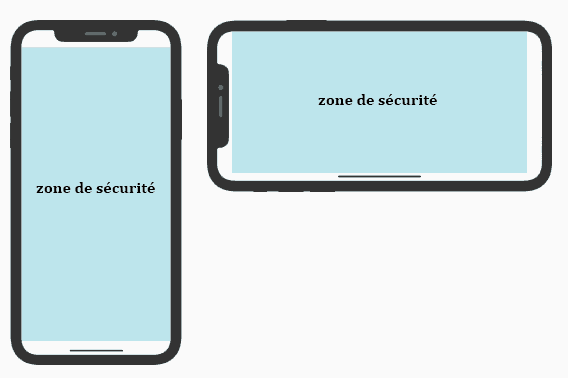
The status bar
Add correctly sized spacing beneath the status bar, in line with the safe area. Avoid assuming a fixed value for the status bar height, as this risks hiding or misaligning the content below it.
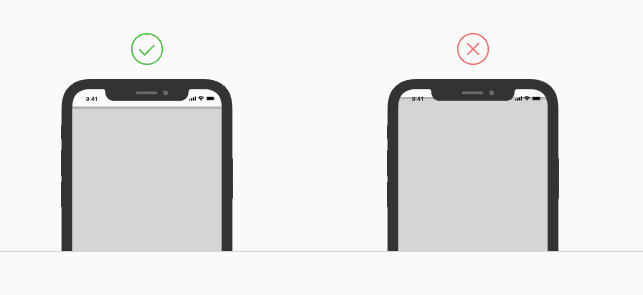
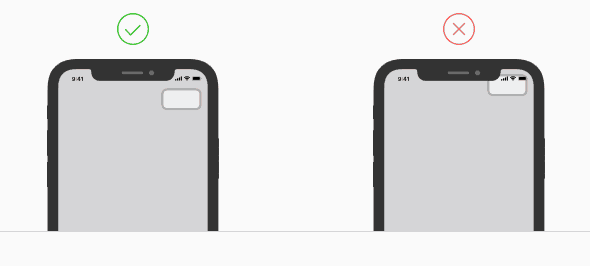
Rounded display corners and the sensor housing
Keep content and controls away from the corners and the sensor housing to fill the entire screen without cutting off the top of your app or having it appear behind the status bar.
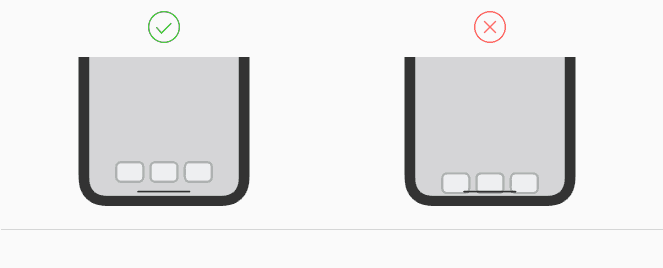
The home indicator
With iPhone X, there is no longer a home button; instead, users swipe up from the bottom of the touchscreen. Make sure your app does not interfere with this home indicator and that your elements do not appear beneath it. This way, your content and controls will remain legible, clear, and consistently accessible.
Screen Edge Gestures
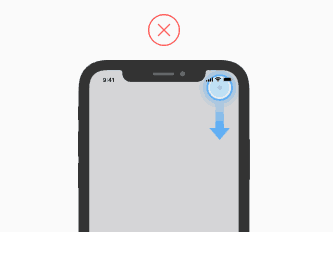
The iPhone X display allows users, with a simple swipe along the edges of the screen, to go to the home screen, the notification centre, the control centre, or the app switcher. Avoid interfering with these gestures. Move your app's controls into the safe area and adjust your user interface accordingly.
If it is truly essential, you may consider using edge protection. This involves allowing the app to be controlled with a first swipe, and using device controls with a second, separate gesture.
A responsive app that adapts to all orientations and form factors
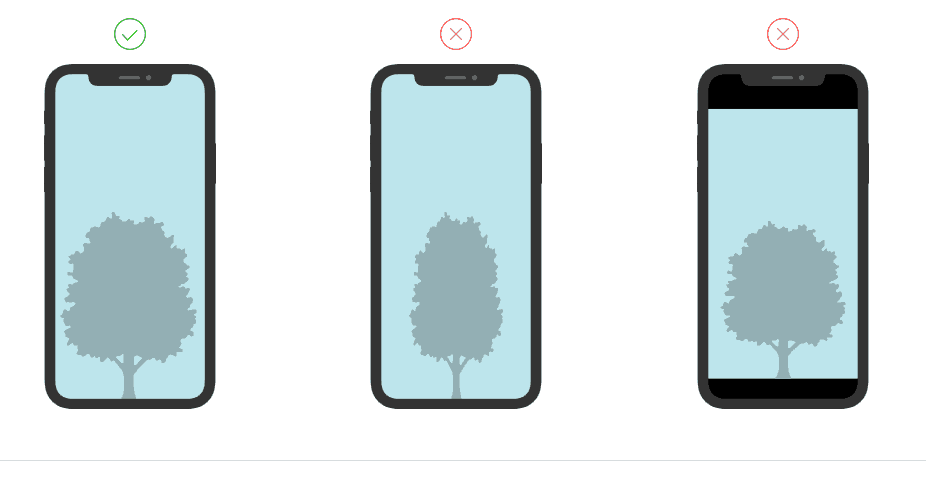
The form factor and screen height of the iPhone X differ from other iPhone models. In portrait mode, the screen width of the iPhone X matches that of the 4.7-inch screens on previous models, but the height is 145 points taller than a 4.7-inch screen.
The new form factor
Many apps position content based on a specific width, height, or ratio. Ensure your app is properly adapted and your content correctly positioned.
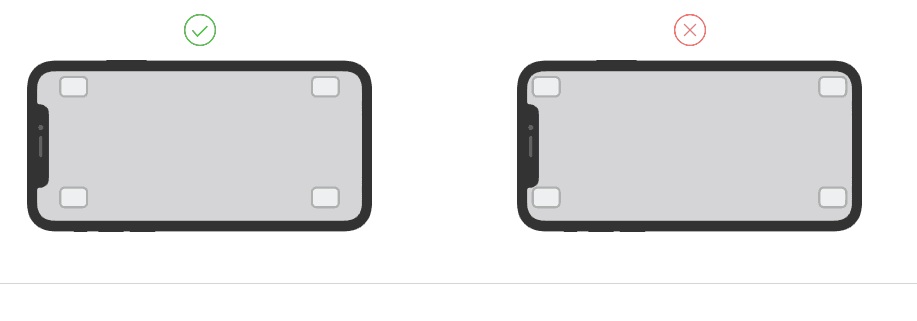
Landscape mode
While portrait mode may reveal a few issues, most of the changes you will need to make will likely be found in landscape mode. Make sure to test your entire user interface with the device rotated both left and right.
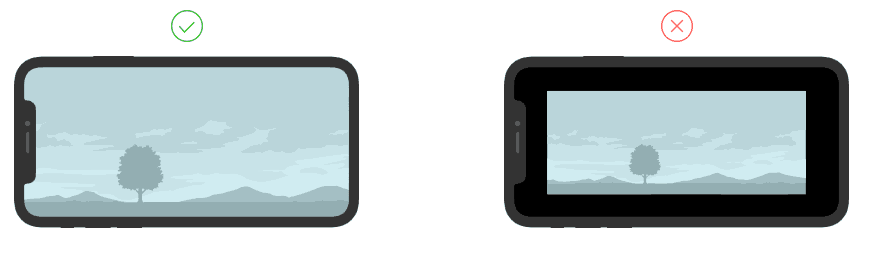
Video dimensions
A video on iPhone X should fill the entire screen. However, if this results in cropping at the top or bottom, or excessive cropping on the sides, the video will need to be scaled to fit the screen. AVPlayerViewController handles this automatically, but some custom video players based on AVPlayerLayer must select the appropriate setting and allow users to switch between display modes according to their preferences.
We hope this checklist will help you prepare well for the arrival of iPhone X on the market, or resolve any compatibility issues noted above as quickly as possible.
For any questions, or to carry out checks and improvements to your mobile application ahead of the iPhone X launch, contact http5000. The Lyon-based digital communications agency will ensure your app looks exactly as it should on iPhone X!
YOU MAY ALSO LIKE
UGC, the future of marketing: How user-generated content can revolutionise your marketing strategy
by Yumea, 7 March 2023
UGC (User Generated Content) is changing the game in the world of marketing. With the rise of social media and content-sharing platforms, the ... READ MORE
Category: News , Getting visible online , Social media
Comments: 0
How to use Instagram to reach your audience and drive traffic to your website?
by Yumea, 1 February 2023
Social media has become an indispensable tool for businesses looking to reach their target audience and drive traffic to their website. With more than 3.8 billion active users... READ MORE
Category: Getting visible online , Instagram , Social media
Comments: 0
7 Artificial Intelligence (AI) tools to know in 2023
by Yumea, 12 January 2023
In 2023, there are many platforms that use artificial intelligence (AI) to help users write content and generate images. If you are looking for tools to help you write... READ MORE
Category: News
Comments: 0