
When printing multiple copies of print products such as business cards, it is essential to be exacting when it comes to cut marks and bleeds. However, there are several types of bleed depending on the finish you desire.
As you might imagine, printed materials are not cut by hand. That task falls to the guillotine cutter, which is precise to 0.25 millimetres. To achieve a high-quality finish and a precise cut, it is important to extend the background beyond the finished format. The bleed will act as a guide for the machine. There are several types and methods of bleed that you can use.
BLEEDS

Solid bleed: It extends around the card like a white frame, which will be removed during cutting.

White bleed: Even if the background of your product is white, you still need to include a bleed, which will be delimited by crop marks and registration guides in the form of black lines.

Photo background extending to the edges: When the edges of the photo overlap into the bleed area, they will be trimmed back at the crop marks at the extremities of your design.

The background is white but the space between the logo and the edge of your design is narrow: only a minimum of 2 mm separates your logo from the edge because you wish it to be positioned that way. This is possible, but do not forget to take the crop marks into account when positioning your logo correctly.
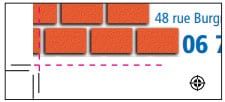
The background extends to the left, with a white margin at the bottom: the crop marks pass through the image background of your design. If this concerns a background, it should not pose any problems unless you prefer everything to be visible on your card.
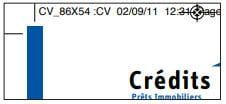
The rule extends into the bleed and overlaps the edges; this means it will be cut at the final format.
MARGINS
Margins are useful for ensuring that the graphic elements on your designs appear exactly as you envisioned once the cut is made. You should therefore always allow for a margin — a buffer — for offset printing (approximately 2 mm, and 5 mm for digital printing).

The white border, also known as a rule, can be thick, which is advisable. It will actually be more visible at 2 mm than at 3 or 4 mm. Several margin options are available for offset printing:
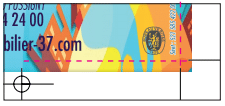
Margins close to the edge: part of a text element, such as a telephone number on a business card, can very easily end up close to the edge. It will not be trimmed, but it risks sitting very close to the border, which does not always produce a visually pleasing result.

Margins far from the edges: for designs on a white background, check that your margins are not cutting away too large a portion of your work — a logo, text, or visual element may look better with space around it than without.

Margins 2 mm from your logo: take care, however, not to have this type of visual cropped, by respecting the margin boundaries.
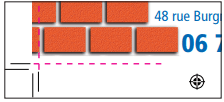
The background extends to the left, but the white margin at the bottom is sufficient: this can produce an original, high-quality result. Bear in mind, however, that digital printing is not the same as offset printing: spacing is perceived differently and the result will not be identical to offset printing.
YOU MAY ALSO LIKE
UGC, the future of marketing: How user-generated content can revolutionise your marketing strategy
by Yumea, 7 March 2023
UGC (User Generated Content) is changing the game in the world of marketing. With the rise of social media and content-sharing platforms, the … READ MORE
Category: News , Getting visible online , Social media
Comments: 0
How to use Instagram to reach your audience and drive traffic to your website?
by Yumea, 1 February 2023
Social media has become an indispensable tool for businesses looking to reach their target audience and drive traffic to their website. With more than 3.8 billion active users … READ MORE
Category: Getting visible online , Instagram , Social media
Comments: 0
7 Artificial Intelligence (AI) tools to know in 2023
by Yumea, 12 January 2023
In 2023, there are many websites that use artificial intelligence (AI) to help users write content and generate images. If you are looking for tools to help you write … READ MORE
Category: News
Comments: 0