

In order to optimise the advertising campaigns you wish to run through the Google network, it is important to understand how they are structured. Your account is organised in a hierarchical tree structure, made up of several distinct sections that each serve specific objectives.
Being clear about each of these sections helps you better understand how everything works and navigate your campaigns more easily. It also allows Google to rank your ads more effectively, as they are considered more relevant.
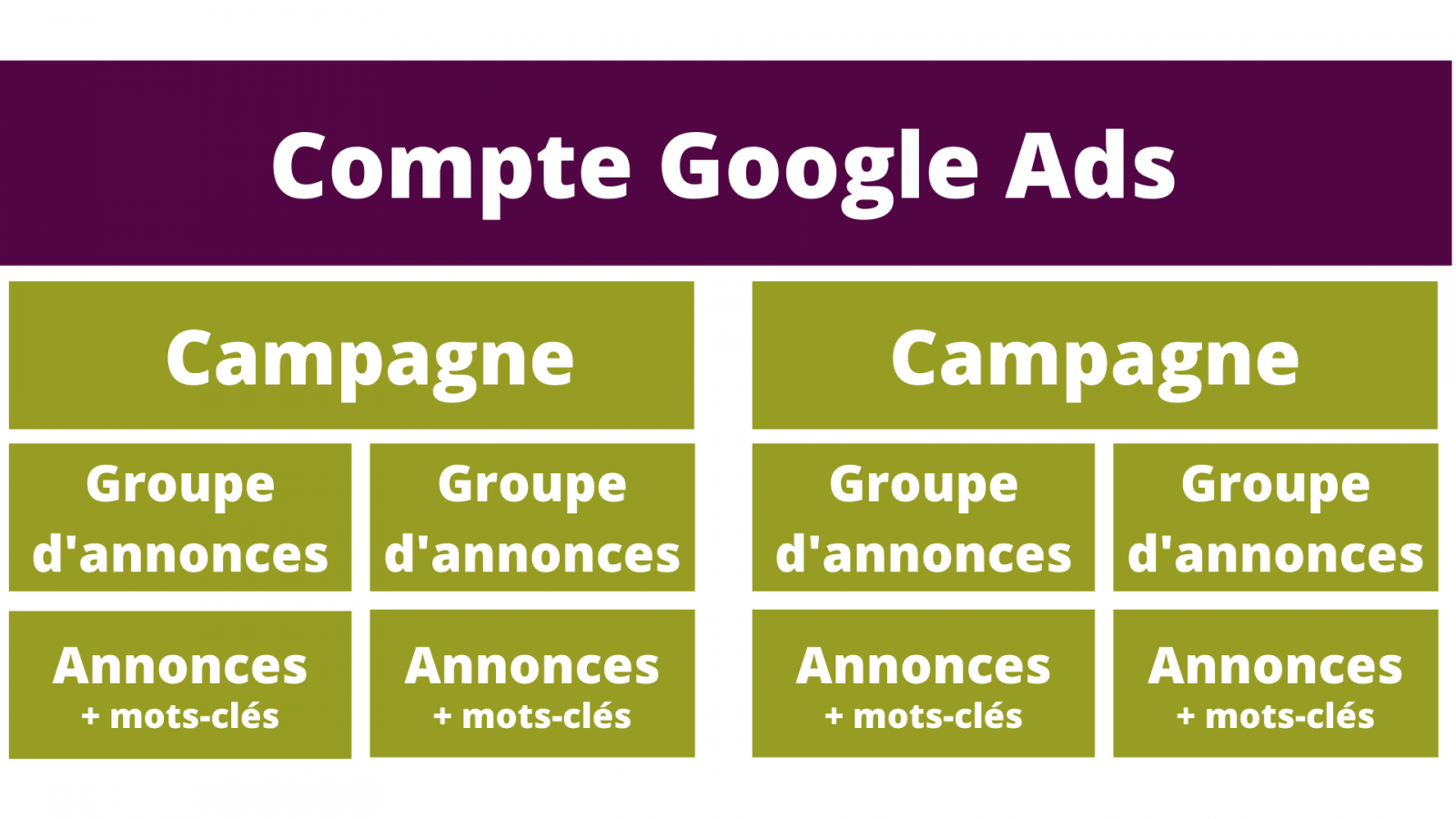
Your Account
Creating a Google Ads account is the foundation for launching your advertising campaigns. By correctly setting up the initial elements of your account, you build a solid base and avoid unpleasant surprises in your results and spending.
When creating your Google Ads account, you will need to provide the following information:
- Your overall maximum budget
This can be modified or adjusted even after campaigns have launched. But it is ultimately the moment to think about the budget you wish to allocate to these promotional activities. If it is your first time, do not commit your entire budget at once — you could, for example, run a few tests by splitting your budget. This will give you a feel for how the system works and, above all, the opportunity to revise your ads to make them more effective. - The geographic area and language of your ads
This is one of the most important steps to ensure the best targeting. With Google Ads, you can choose where your campaigns are shown at several levels: a state, a region, a department, or even a radius around a given point. If, for example, you want to communicate your delivery offer, target only the towns where that service is available. Setting a broader area will not yield good results, as some of the audience clicking on your ad will not be relevant to the offer. By the same logic, specify the target language for your ads — they must be understood by the people who see them. - The type of campaign
Google Ads gives you the option to run your campaigns across different types of networks, depending on your needs, objectives, and content. You will be able to choose from:
– Search network campaigns: text ads displayed on the Google search engine and its partners
– Display campaigns: illustrated ads served across numerous websites and apps (banners, etc.)
– Video campaigns: allow the distribution of video ads on YouTube
– Shopping campaigns: your product listings are promoted via Google Shopping
– App campaigns: as the name suggests, these promote your app across various channels
– Local campaigns: to drive customers physically into your store - Campaign start and end dates
Avoid the trap of running your campaigns over excessively long periods or during dates that do not align with calendar events, seasonality, and so on. Google Ads lets you create your ads while scheduling when they will run. This helps you manage your budget more effectively by ensuring your campaigns run at the right time. And do not forget to stop them…
If you manage several accounts at once, give them clearly distinct names to avoid confusion and costly mistakes. Generally, to keep things simple, you would obviously use the name of the entity running the ads (company name, etc.).
Your Campaigns
We can be tempted to create just one campaign grouping all our ad groups around different themes. However, this is not the ideal segmentation — it can even prove counterproductive when you look at the results. Your campaigns should ultimately serve as categories for your ads. One category = one campaign.
Take the example of a ready-to-wear retailer. They would be well advised to create one campaign for dresses, another for skirts, and another for trousers. Although all the items mentioned are clothing, the way we search for them differs by product — so you may as well optimise the matches and reach the users who are genuinely interested.
Having defined your overall budget when creating your account, you can now distribute it as you see fit across your campaigns. Here too, it is possible to set specific run dates for each campaign.
Your Ad Groups
As the steps progress, things become more concrete and specific. An ad group will always contain at least one ad. Having defined the broad categories that make up your campaigns, you can proceed with a further layer of segmentation to maintain the same level of precision.
So, if you are working within the "dress" campaign, you can create different ad groups linked to that theme but highlighting specific characteristics. Draw inspiration from the search terms you yourself would type if you were looking for your own product online. For example, you could launch the following ad groups: summer dress, maxi dress, cocktail dress…
With this level of precision, you can connect the most relevant keywords possible to your ad group. Once again, this helps you avoid unnecessary spending caused by poor targeting or a scope that is too broad.
Your Ads
This is perhaps the most enjoyable part of launching a campaign. While you must follow a number of rules to be as relevant as possible and get your ads shown, writing Google Ads copy is the moment where you can put your own words to an activity, a product, a service, and so on. Let your commercial instincts shine.
The elements to fill in:
- The final URL
This must without exception take the visitor to a page that is directly related to the ad. This relevance will influence the quality score of your campaign and your conversions. - Headlines
Your headlines must be both concise (30 characters maximum) and impactful. Get straight to the point, highlight what you are offering, and above all incorporate your most important keywords. Do not hesitate to write around ten — Google will select the most appropriate ones at the time of the search. One last tip: capitalising the first letter of each word will make your ad stand out more in the search engine. - The "path"
This is a URL path supplement that helps guide your visitors. It gives you the option to better define your web address using 2 terms of up to 15 characters each. - Descriptions
You must write at least 2, but why not provide up to 3 or 4? Here too, be precise and persuasive. Use action verbs to encourage the user to click on your ad: "Discover our selection…", "Enjoy a discount…", "Request your quote…", etc. Include a few keywords as well, and be clear — without repeating too much of what you have already said in your headlines.
Since Google Ads has thought of everything, it will show you the score for your ad. This gives you guidance on what could be completed or improved. It also suggests elements for you to consider — though not all the ideas will be good ones, they are always worth taking into account.
It is at the ad level that you will be able to choose and add extensions so that your ad is as relevant and visible as possible, particularly on the search network.
You now have a clear picture of how your Google Ads account is organised and what each level entails. You can already start thinking through all the content and strategy you wish to develop to launch your first campaigns. Off you go!