
MailChimp is one of the most popular platforms for sending newsletters to your subscribers. It is used for everything from sending messages and including a purchase or sign-up button, to sending adverts, catalogues, event alerts, and much more.
All of this is very interesting. But readers have already seen all of this, for years. It no longer surprises them — it has become ordinary. To rekindle their interest, something different, something a little more creative, may be the solution.
By looking a little further afield, you can find more creative ways to use MailChimp.
Why email? As MailChimp points out, email is still one of the most effective and creative ways to reach your target audience. Mainly because it is convenient for readers: they do not have to go looking for information — it comes to them.
Let us look at 10 unusual ways to use MailChimp templates. 10 examples from which you can draw inspiration.
Create an email magazine
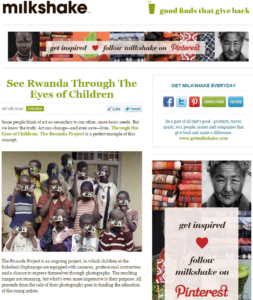
Magazines often send newsletters by email featuring their latest news. These usually consist of previews of the articles on offer, with a link to read the full piece each time.
Rather than sending links to the full content of your articles, you could develop a magazine specially designed for email delivery.
This would be a lightweight magazine (at least in terms of images) that would need to focus on the essentials. Think quality, not quantity. When you write for a specific audience or niche, you have a greater chance of reaching and being read by your target. You do not necessarily need a large number of articles. A single well-targeted, relevant piece can suffice.
Why send an email magazine rather than a link to the magazine by email? It is a matter of convenience for the target audience. It is a bit like a print magazine: would you prefer to go to a shop to pick it up, or have it delivered directly to your door?
Of course, a click to reach your website only takes a few seconds. But would you click if you only had a minute or two to spare? Especially given that you would still have to click again on the site to read the articles. It is unlikely, particularly with the generalised cognitive dispersion on the web (internet users are overwhelmed with stimulation and get lost on pages, distracted by a thousand inputs).
In contrast, if the article to be read is directly in your email, you might appreciate not having to leave your inbox to discover it, and be more inclined to read it.
Deliver a course by email
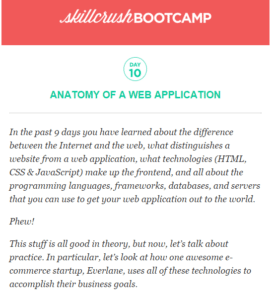
You are an expert in your field — you know that. You can share your knowledge through a course. Simply choose your topic. The convenience of email can be a wonderful way to teach on any subject. It can be a full course or a link to a tutorial video.
Some examples: HTML, Photography, Writing, Drawing, Web design, Business — any type of tutorial that can be taught online.
A course delivered directly in an email can be more effective because, again, the reader will not need to visit your website to benefit from it — a great way to overcome the procrastination barrier.
Publish a local newspaper
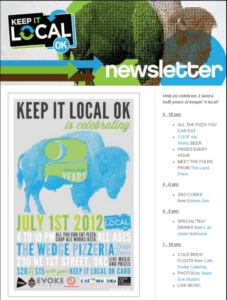
Here, we are not talking about a free newspaper or the newsletter of a specific neighbourhood. Here it is about a newspaper designed specifically for your local community. It may cover just a small section of your town, or your immediate neighbourhood or even your building.
This newspaper would include news that most publications would ignore in favour of stories reaching a broader audience. There is plenty of news in your community that deserves coverage. Your friends and neighbours might appreciate something written just for them.
You can focus on a niche audience — for example, by offering information specifically for a group of farmers, surfers, cooks, and many others.
A top news round-up
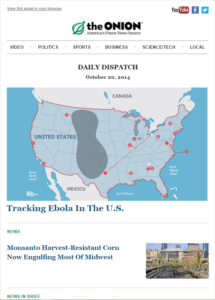
Rather than a newsletter, you could send a top-news round-up on a specific niche. This could include news, interviews, what is new or coming soon, and so on.
Popular news is everywhere, but it can be hard to find coverage of a specific group such as luthiers or tractor mechanics. You could send a star chart to your astronomy fans. It could also be a publication covering the major stories around a specific location, group of people, or industry.
This could appeal to company management when communicating with teams in an industry or business. Imagination is the only limit.
Tips lists
People love receiving tips and tricks. You could send, for example, the tip of the day, or number your tips across each email. This works especially well for a specific category, such as writing fiction or songwriting.
Readers looking for tips on writing a science-fiction story will almost certainly not sign up if you give them advice on how to hold a baseball bat on Monday and a pottery tip on Tuesday.
Even coaching, on any topic, can work in the form of tips.
You do not even have to structure these tips as a list. You can include a single tip that can be read in just a few seconds, or a more substantial tip that takes several paragraphs to cover properly.
Classifieds
You can send your own classified ads. This can work either for a specific category (cars, comics, baseball cards, etc.), or by grouping several categories and focusing instead on a geographic area (the Rhône-Alpes region, Paris, etc.).
Recipes
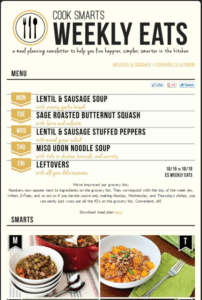
Recipes are popular. And there are many ways to use them to your advantage. You can offer a recipe of the week, or send recipes for a specific niche audience or group. Where this can be truly useful is for subjects that do not make the headlines, or for special dietary requirements.
For example, people with G6PD (Glucose-6-phosphate dehydrogenase deficiency) must be careful with iron supplements even when they are anaemic. This may seem paradoxical, and most people would not even suspect the existence of such a condition. These individuals must avoid broad beans and soy, and eat plenty of B vitamins and antioxidants.
Designing and adapting recipes accordingly is a significant undertaking. And busy mothers cannot necessarily do much research on the matter. They would therefore not say no to the idea of receiving specialist recipes directly in their inbox. Weight-loss diets or diabetic recipes are fairly well covered online. But something like G6PD, much less so.
More generally, this would spare your readers from having to look up recipes for a specific type of cooking themselves. For example, if your goal is to create chocolate sculptures, special cookies, or barbecue dishes.
Novel
Emails are a good way for authors to share news about their work. But what about their work itself? Why not share a short story, chapter by chapter, by email? It would be a great way to provoke and sustain readers' interest in the rest of your work. You could send a short story of a few pages and include a link to your longer works.
You can also reveal the first story in a collection to hook readers. You can create a special, one-of-a-kind email containing your short story that only your most devoted fans will receive and be able to read. This can be useful for building and developing your fans' interest and loyalty. It is also a perfect way to include a pre-order button for any work due for release in the near future.
Trivia
Who does not love a bit of trivia? A few cultural facts can be an entertaining distraction, especially when most other emails are simply trying to sell something. Trivia can be varied, genre-specific, set in a particular era, drawn from the world of fiction, about fun facts, music — in short, about anything!
For example, if you love Star Wars, you can send trivia about the films, books, games, behind-the-scenes information, facts about the actors, fictional and real-world locations, design, toys, comics, posters, and so much more.
If you love WordPress, you can do the same. This could even tie in with the tips we discussed earlier. Or result in trivia about the history of web development and WordPress. Your clients could learn a great deal and think of you the next time they need a WordPress expert.
An email game
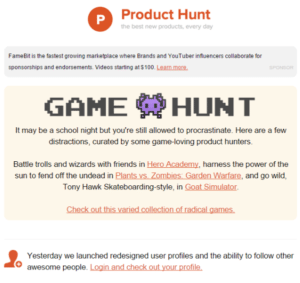
You can create some very enjoyable games by email. For example, a treasure hunt where you send your players searching for specific items. Or a geolocation challenge where players must find a particular shop. These are not virtual or interactive games within the email itself, but something that takes place in the real world.
The answers for the results — such as finding the requested object or location — can take place online or offline. It is up to you.
How to access the Templates
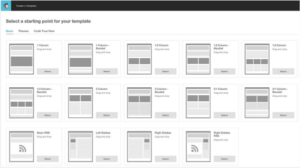
Now that we have reviewed the types of templates you might want to use, you need to know how to access or create them. Here are three ways to do it:
- Use a ready-made layout. There are basic layouts available by default for your emails, which contain the different sections you will need. They are responsive and you can add or remove elements to create your own design.
- Use a theme. This is a pre-made template with a unique design and specific elements. You can again add or remove elements and adjust each one to your liking. Many themes are made available by developers. Some are free, others are paid.
- Code your own template manually. You can copy and paste your code into a text editor, import your HTML code into the template editor, or import a zip file containing the HTML code and your images.
How to build your Templates
If you opt for creating your MailChimp templates from scratch, you will need some information to get started. MailChimp already offers several tutorials on template development. Here is a list of things you need to know how to use:
- HTML
- MailChimp template language
- CSS styling
- Declaration blocks
- Background images
- Editable content areas
- Editable image areas
- Repeatable content areas
- Hideable content areas
- Variable content areas
- Merge tags
- External links
The elements of a good layout
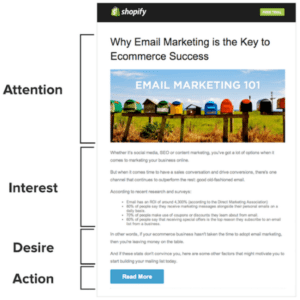
Whatever the reason for using MailChimp templates, a good design will inevitably encourage the reader to take the action you want. This can be summed up by the AIDA method, which consists of successively triggering from the prospect their:
- Attention
- Interest
- Desire
- Action
Applying this method to the design of your email can greatly contribute to obtaining the desired action from your target audience.
A few final quick tips
If that is enough for you, use basic, pre-built templates as a starting point and customise them to your needs.
Save the template empty of content so you can reuse it as many times as you like afterwards.
Do not spam. Readers would end up unsubscribing, or even reporting you as junk mail.
Create something outstanding. Your readers' inboxes are already flooded with messages to which they have long since stopped paying any attention. Create something they will want to open, read, use, and share.
Do not forget to include links to your social media in your emails.
Browse MailChimp's Inspiration page for ideas.
Visit MailChimp's Support page if you run into difficulties.
All of these explanations barely scratch the surface of the full range of features MailChimp has to offer. But whether it is through sharing tips, trivia, story excerpts, or any of the ideas we have discussed, it is ultimately inspiration and imagination that will make the difference.
With a little creativity, your efforts will bear fruit and you will gain the attention of your prospects on MailChimp.
Translation and images: Elegantthemes.com