
When WordPress was used solely for blogging, spammers were not a particular problem to manage.
But since the platform has expanded — in features and in number of users — they have become commonplace on many sites.
Quality WordPress maintenance and support
Indeed, WordPress has become the most widely used web publishing software, and therefore the most popular. This inevitably attracts spammers, who create fake WordPress accounts to spam and/or attempt to inject malicious scripts.
Fortunately, there are a few simple tricks to combat the problem and get rid of spammers once and for all.
In this article, we will explain how to identify and remove spammers who are already present, and then how to prevent new spammers from registering.
Why are spammers a problem on WordPress?
Spammers can harm your site both internally and externally, which is why they can represent a significant nuisance.
Internally, spammers clog up your databases and make managing your site more difficult. If you have to sift through hundreds of spammers to find and manage your genuine users, you will waste a colossal amount of time. Similarly, if your server has to store all these spammers, it will operate far less efficiently.
Externally, spammers can post unwanted outbound links. This can damage your search engine rankings, and consequently your visibility and position in Google search results.
This is especially problematic if your site includes certain communication modules (BuddyPress, for example) that allow users to create a social network. In such a scenario, spammers can send private messages to your genuine users — something they are unlikely to appreciate.
How to identify and remove existing spammers?
Once you have put the preventive measures in place (discussed below), you will fortunately not need to resort to spammer removal techniques very often.
If you are new to all this, however, you will need to identify and remove spammers who are already on your site.
If there are relatively few of them, you can remove them manually. If it is a genuine infestation, a plugin will let you eliminate them automatically.
How to manually remove spammers on WordPress?
The simplest way to remove a user who is behaving like a spammer is through the Users section of your WordPress dashboard. Select the spammer and click Delete.
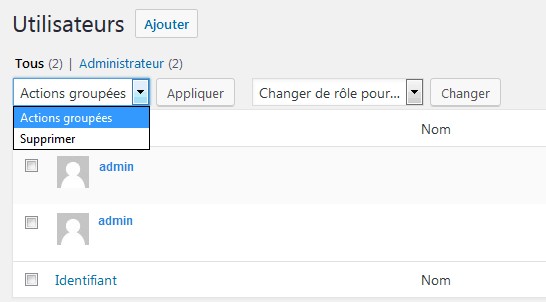
Obviously, with a relatively large number this can be complicated, particularly since WordPress only displays 20 users per page by default.
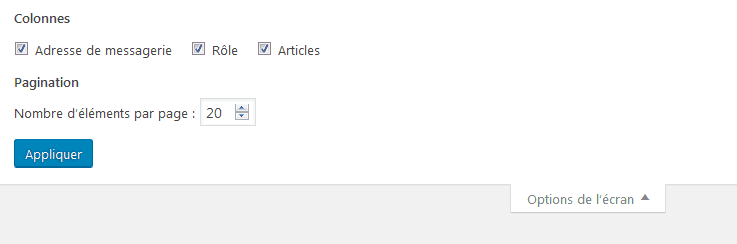
Fortunately, you can change this number by clicking on "Screen Options" in the top right corner. This will drop down a new menu where you can change the "number of items per page".
If the task is too tedious to do manually, you can automate the process using the Bulk Delete plugin.
Bulk Delete, as the name suggests, allows you to delete in bulk users based on certain criteria, such as:
- specific user roles
- specific metadata
- the date the user last logged in
- the user's registration date
If spammers are well mixed in with genuine users, these criteria may not be of much help. But Bulk Delete is a good tool for tidying things up in a few clicks when spammers all registered around the same dates — or for removing old undesirables who only logged in once and were never seen again.
Identifying and removing undesirables with a plugin
When there are too many spammers to eliminate manually, you can use the SplogHunter plugin (formerly known as WangGuard).
SplogHunter scans your user database and compares it against its own database of recorded spammers. When a name matches between the two databases, the relevant user is transferred to "Sploggers" — a new section within your WordPress Users area. All you then need to do is check that section to make sure no genuine users have ended up there by mistake, then delete the entire list of undesirables.
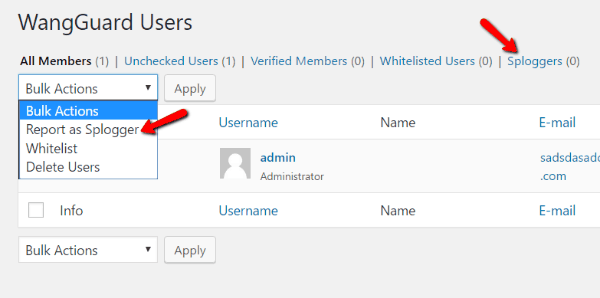
SplogHunter also offers a "Report as Splogger" button. The selected user will be deleted from your database and added to SplogHunter's own database. This allows other site owners like yourself, who also use SplogHunter, to automatically eliminate that spammer if they venture onto their site.
How to prevent new spammers from registering?
Getting rid of undesirables is good. Preventing future spammers from registering on your site is better.
Here are 3 simple practices to help you do so:
Strengthen your registration form with a CAPTCHA
The downside is that every genuine user must then "prove" they are not a robot. Everyone has experienced this at least once when signing up for something, and it is not always a pleasant experience — particularly with illegible CAPTCHAs.
Use a plugin that checks registrations against a spammer database
This technique is more convenient in that it does not inconvenience genuine users. It simply blocks known undesirables.
Add access rules to prevent spammers
If you notice that many undesirables are coming from, for example, a .ru domain name, you can block any user trying to register with a .ru email address.
A few tools for putting one or more of these techniques into practice
Adding a CAPTCHA with Captcha by BestWebSoft – Free
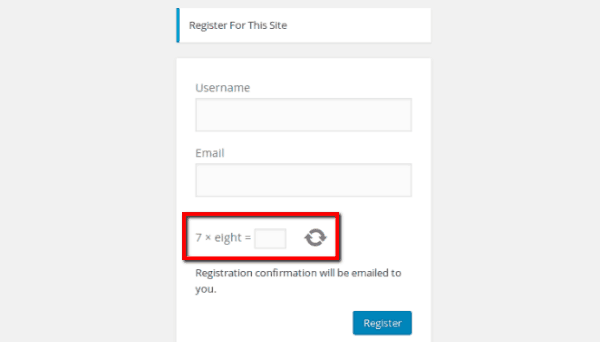
If you want all users to complete a CAPTCHA before they can register, you can use the Captcha by BestWebSoft plugin.
As mentioned, this can inconvenience users, although they are generally accustomed to this type of procedure. But when faced with a genuine spam problem, it is an unavoidable solution.
Key features:
- Works optionally for logins, registrations, password resets, comments, and contact forms
- Adds a simple maths equation that defeats bots
- Allows the user to get a new question if the first CAPTCHA is too difficult
- Option to set the difficulty level of the maths questions
- Option to use an alphanumeric CAPTCHA as well
Automatically detecting undesirables without a CAPTCHA using SplogHunter – Free (for now)
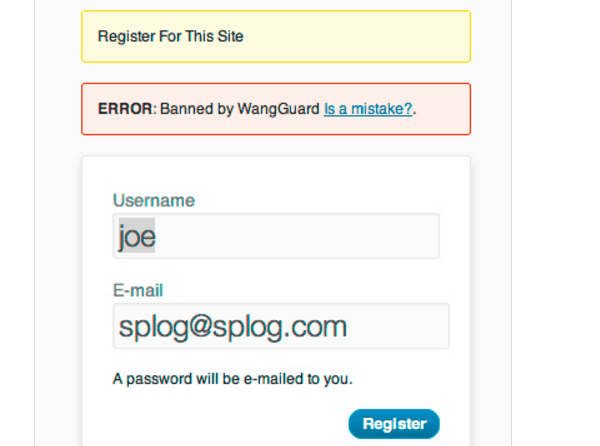
In addition to sorting through already-present spammers, SplogHunter can also protect your registration forms without requiring a CAPTCHA.
When a user registers, they are automatically compared against SplogHunter's spammer database.
Key features:
- Blocks unwanted registrations without a CAPTCHA
- SplogHunter's database is constantly updated as it is crowd-sourced
- Option to prevent registration from certain domain names
Using the all-in-one WP-SpamShield Anti-Spam service – Free
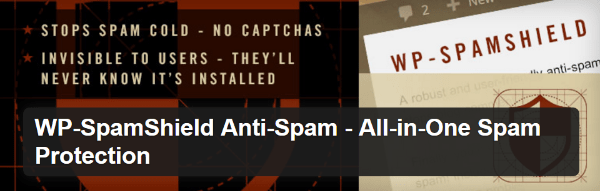
WP-SpamShield Anti-Spam is a well-regarded plugin that protects against spam on many aspects of a site, including registration forms.
The way it works is quite clever. The tool protects you at the level of your site's cookies and through an anti-spam algorithm — with no need for a CAPTCHA.
Key features:
- Protects against unwanted registrations, comments, and all other forms of spam
- Works without a CAPTCHA
Tackle spammers as early as possible
When you own a site where users can register for certain features, spammers can be a genuine problem. These bots can harass your genuine users, overwhelm your database, and damage your search engine rankings.
But with the right protections in place, you can get rid of them and prevent new undesirables from arriving.
Between SplogHunter, WP-SpamShield, and CAPTCHA implementation, spammers will soon be nothing more than a bad memory.
(Freely translated from Elegant Themes / Photo by Yuri Samollov)