
If you have been in the world of web development for some time, it is more than likely that you have heard of or used a content management system (CMS for short) at some point. But perhaps you still find yourself wondering what exactly a headless CMS is.
You may be familiar with a traditional CMS like WordPress or Drupal… but in recent years headless CMS has seen significant growth and it is well worth taking a closer look.
Let us start with a few definitions.
Traditional CMS vs headless CMS

Traditional CMS
The traditional CMS is a popular tool for web creation. Simply put, users can create and edit content and store it in the main database. All of these features in a single system.
By choosing from a range of templates and themes, the appearance can be customised and functionality extended with available plugins. These CMS platforms often provide a "What You See Is What You Get" (WYSIWYG) experience, which makes them more accessible for non-technical users.
So, broadly speaking, a traditional CMS consists of:
-
a database for storing content,
-
an administration panel for management,
-
an API that ties everything together,
-
a front-end for displaying content.
What is important to understand here is that the front-end and the back-end are coupled — they are bound together.
Headless CMS
In a nutshell, a headless CMS is a back-end-only content management system.
Remember that traditional CMS platforms like WordPress or Drupal had their front-end and back-end tightly linked, right?
With a headless CMS, it is the opposite: it decouples content management from the presentation layer. If "head" is the presentation layer (or the front-end) and "body" is the content repository — we cut the head from the body, hence the name "headless". What remains is raw content that we can access via API calls. Our CMS is now solely a content data source.
And since we no longer have a default front-end, we are free to create as many "heads" as we wish and deliver our content on any device. This also means no restrictions on the framework or tools you use.
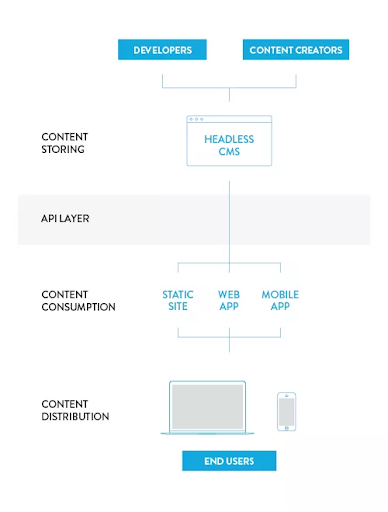
Furthermore, this decoupled approach is perfectly suited to JAMstack builds.
What are the advantages of a headless CMS?
-
Flexibility — you have complete control over how your content appears and can work with your preferred frameworks and tools
-
Enhanced security — since the content publishing platform is not connected to the database, the risk of malware attacks is lower
-
Reusability — you can use and reuse your content to serve any digital channel
-
Accessibility — content delivered via API is easier to maintain and distribute, and easier to modify for non-technical users
-
Future-proof — since the presentation and logic layers are separated, you can structure your content and make it adaptable to future changes
Should you go headless (or not)?

If you feel a traditional CMS is too restrictive for you and you need a more flexible tool, then you should consider going headless.
If you want to build unique websites that can be displayed on any device, you will not benefit from a pre-defined template.
Moreover, a traditional CMS offers you everything ready out of the box, but as a side effect you will end up stacking a lot of unnecessary code.
This is not the case with a headless CMS, where you can choose to integrate only the features you actually need.
And as mentioned earlier, it is technology-agnostic, meaning you are not locked into a specific technology stack. It is a developer-friendly solution. It is ideal for use cases such as:
-
websites and applications built on any JavaScript framework (React, VueJS, AngularJS),
-
sites built with a static site generator (such as Gatsby),
-
delivering content across multiple channels.
But if you do not have the technical resources or you are not relying on developers to manage content, it may make more sense to use a traditional CMS.
Especially if you are working on a small project such as a personal website or a blog, it would be easier and less expensive to use a template rather than building everything from scratch. So bear in mind that a traditional CMS can sometimes be the right choice for you.
Here is a list of some of the most popular headless CMS platforms at the moment:
-
Hygraph
and many more…
Conclusion
The future lies in finding ever more innovative ways to delight users with their experience, and "headless" is certainly the most interesting approach right now.
We hope this has helped you get to grips with the subject and that you now feel more ready to give it a try.