
Static sites and web servers
The early internet was made up of static sites. Every page a visitor viewed was represented by a different HTML page. Every user who visited a site saw the same content as everyone else.
A little later, web servers capable of producing HTML dynamically arrived on the scene. The typical flow looked something like this: a user makes a request that may or may not be protected by a CDN. That request reaches the web server, which interacts with a database or APIs. Based on the data returned by the database or API, the web server generates HTML pages and serves them to the browser.
Historically, static sites presented fewer security risks and prevented the application from spending time per request generating each page, which made them more performant.
On the other hand, static sites made it difficult to share code between files. Furthermore, a developer typically needed to update the content of a static site because it was written directly in HTML. For these two reasons, large static sites can become difficult and time-consuming to maintain compared to a web server.
Unlike static sites, web servers can make real-time decisions about what content to display or hide to a user, offering more sophisticated personalisation with less effort. However, generating a dynamic web page every time a user visits a page takes a great deal of time.
In recent years, static site generators such as Gatsby.js, Next.js, and Nuxt.js have made it possible to find a happy medium. It is now possible to enjoy the performance and security advantages of a static site whilst retaining the ability to share code easily and pull content from a CMS.
How does it work?
Gatsby
Gatsby.js externalises a large part of the configuration that comes with building a JavaScript front end in 2018. It handles Webpack, React.js, HTML, and CSS configuration for us, so we can simply focus on building new features — whilst retaining the ability to customise them.
Since Gatsby is a static site generator, we can write code in React.js rather than writing HTML, CSS, and JS by hand. The Gatsby documentation describes this process well: during the build, Gatsby performs an "optimised production build" that generates "static HTML and JavaScript code bundles per route".
A Gatsby plugin called gatsby-source-contentful makes it easy to pull content and assets from Contentful into Gatsby. We query this content using GraphQL.
Static files need to be deployed and hosted on S3, and a cached version of those files served via Fastly, reducing latency and thereby improving the user experience.
Content
The best approach is to store all content in Contentful so that there is no need to manage a database, server, or custom CMS. It is also good practice to have a webhook that triggers a build from the CMS to kick off a deployment.
Circle CI
Circle CI is used for continuous integration and for launching the deployment flow. Circle CI runs Jest and Flow, executes the build and verifies that it succeeds, deploys the code to a staging branch, and runs Cypress tests. If we are on the main branch, it rebuilds the site with our production environment variables and deploys to Amazon S3.
Amazon S3
We host the static files generated by Gatsby in Amazon S3.
Fastly
Fastly is a content delivery network (CDN) used to cache the content stored in the S3 bucket so that we can serve it even faster to our users. We configure Fastly to decide what content we want to cache and for how long, and use both gzip and Brotli to serve pre-compressed files.
The hosting architecture
Let us explore in a little more detail how we have configured Fastly and S3 to deliver our content as quickly as possible to our users.
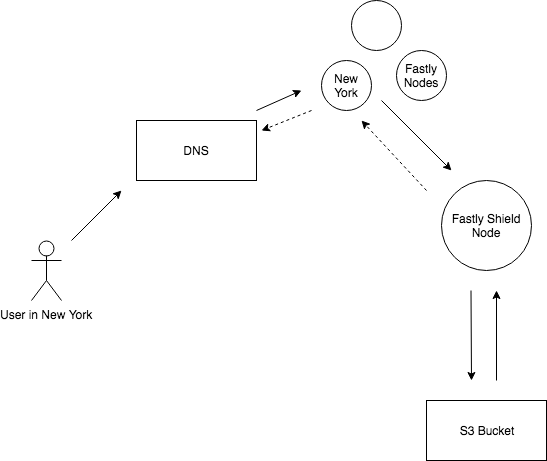
Imagine we have a user in New York. That user makes a request to shopflamingo.com. Once the DNS record is returned, we send a request to Fastly. Since there is a Fastly node in New York, the request will be directed there (in most cases).
We ask the Fastly node whether it has cached the most recent version of the site. If the Fastly node has the current version cached, it will return it to the user. This process eliminates the need to continue down the request chain and reduces latency. If the Fastly node does not have a current version of the site cached, it will make a request to the Fastly Shield node to obtain it.
If the Fastly Shield node has the current version cached, it will return it to the user, updating the node in the user's region along the way. If it does not have a cached version, it must request it from the S3 bucket.
After a fresh deployment, the first user in a region experiences the most latency. Their request will go all the way to the S3 bucket, as none of the Fastly nodes has a current version of the site cached. Once that initial request is made, all other users in that area can access the site from the nearest Fastly node, reducing the time for them. Moreover, the first user will also access a cached version of the site from that point onwards, until a new version of the site is deployed.
We work hard to serve existing content to our users as quickly as possible — but what about new content? The second major component of our architecture allows us to deploy quickly and easily multiple times per day.
The deployment flow
We have automated every part of our deployment flow to avoid time-consuming manual steps and to put in place checks that ensure we are not deploying broken code to our users.
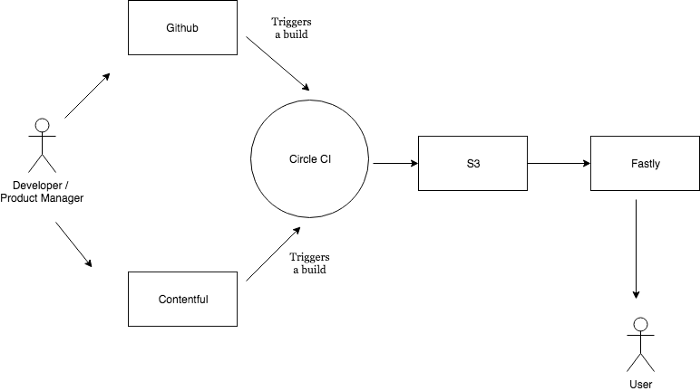
The process begins when someone triggers a build. To trigger a build, someone pushes their code to Github or publishes a change in our CMS.
Circle CI steps
Once we trigger a build, Circle CI goes through a number of steps:
-
It runs Jest and checks whether the Jest tests pass
-
It runs Flow and ensures all our type checks pass
-
It executes the build and confirms the build passes
-
It pushes the changes to a branch
-
It runs the Cypress tests
-
(Optional step) If we are on master and all tests pass, Circle CI will rebuild the site with the production ENV variables.
If any of these steps fails, Circle CI will fail the build and the process will stop.
Once the build is green (on staging or master), Circle CI pushes the static files generated by Gatsby to S3, and the process described in the Hosting Architecture section begins.
The full system
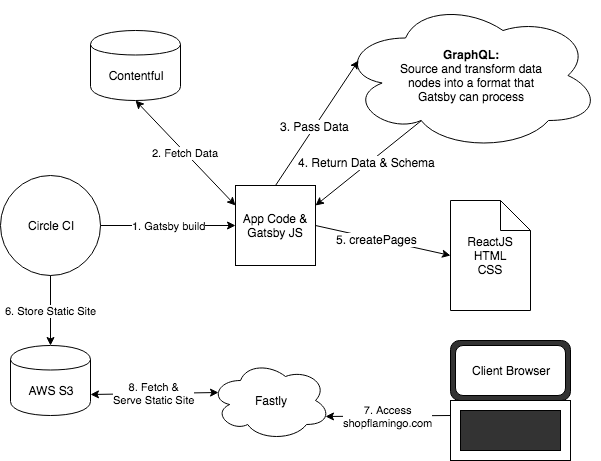
Now that we have covered the two main components of the system, here is a diagram of everything working together.
-
A developer or product manager pushes to Github or publishes to our CMS
-
Circle CI triggers a build
-
Gatsby builds the site
-
Gatsby fetches data from our CMS
-
Gatsby passes the data to GraphQL
-
GraphQL returns the data to Gatsby
-
Gatsby builds the static pages
-
Circle CI pushes the static pages to S3
-
Fastly fetches and serves the static site
-
A user accesses shopflamingo.com
By following these steps, we aim to create a highly performant e-commerce site — and that is certainly what we achieve.
Freely translated from English: Medium article
Photo credit: https://pixabay.com/en/space-rocket-travel-science-sky-1951858/